WebStorm missing the option to choose 'On WSL' for the Python Interpreter
Answered

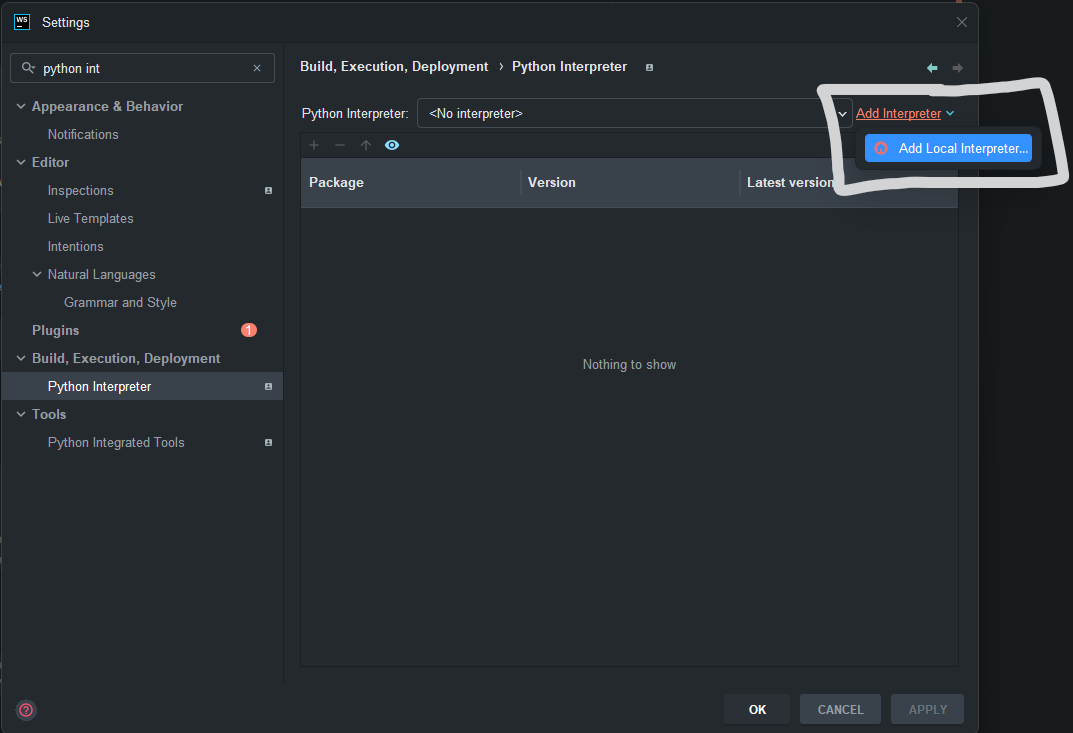
In PyCharm, the circled area in the screenshot below has the options to choose ‘On WSL’, however this is missing in WebStorm. Is this intentional or as my WebStorm bugged? Running the latest version of WebStorm.
Please sign in to leave a comment.
Usually this is related to some required bundled plugins being disabled - Can you check this article and let me know if it solves the issue - https://youtrack.jetbrains.com/articles/SUPPORT-A-1908/Unable-to-add-SSH-WSL-Docker-interpreter-with-PyCharm-Pro-after-update-upgrade
In case it persists, please provide us with the IDE logs from Help | Collect Logs and Diagnostic Data
You can upload them here - https://uploads.jetbrains.com/ and share it's ID
Hello, I just checked and I have all three of those plugins already enabled in WebStorm. I tried disabling them and re-enabling them, no luck
Logs as requested: Upload id: 2025_11_12_GxDkDnvpMhAjxXyLjaNtkL (file: webstorm-logs-20251112-21403112235217597580458017.zip)
Actually, I checked further and only the Python Community plugin is available on WebStorm, so remote Python interpreters, such as wsl are not available in the IDE. You can use PyCharm for that
Thank you for clarifying. It's unfortunate that I have to have both WebStorm and PyCharm open simultaneously when working on a project that uses a Python backend (with libraries that are not compatible on native Windows). Adding WSL support to the Python Interpreter on WebStorm would allow me to only use WebStorm to work on my project. Is adding WSL support to the Python Interpreter on WebStorm something that is planned?
Unfortunately we have no plans to implement it - Feel free to create a feature request on YouTrack