Is quarto supported in PyCharm?
Answered

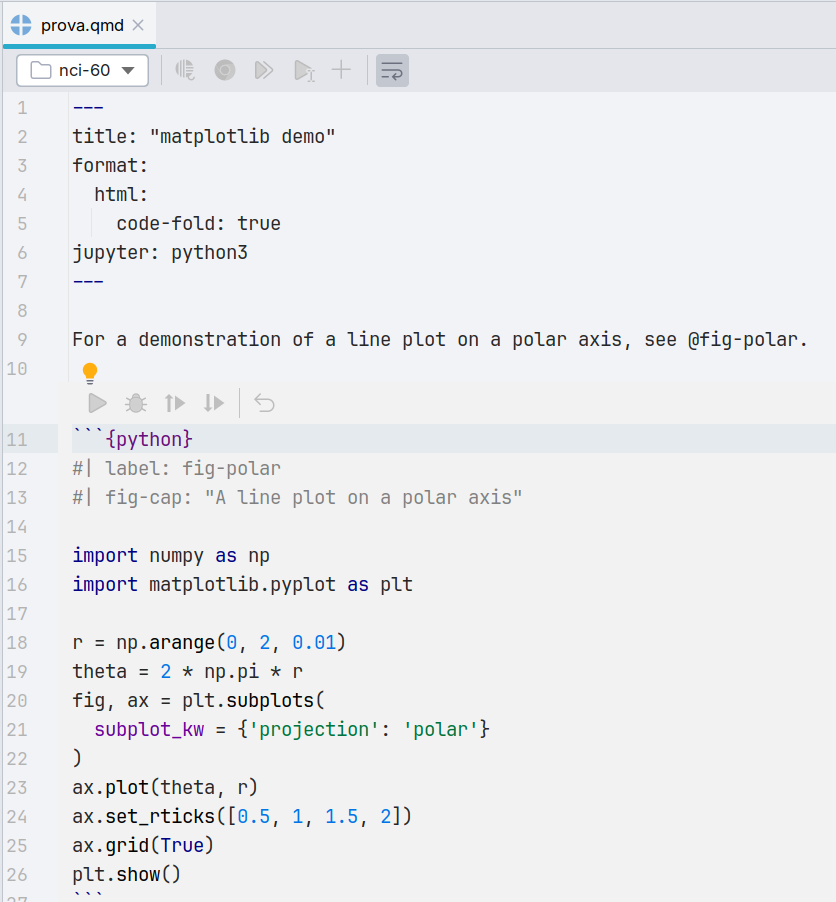
I have a .qmd file opened in a PyCharm project, and I see that the editor colors the syntax, recognizes cells, but the buttons to run/debug the cell are disabled. See screenshot. Is there a way to enable them? Can PyCharm (or PyCharm Pro) run/debug quarto markdown scripts?
I have the latest version of quarto installed on my Ubuntu 24.04 PC, and can run quarto from the command line.
Please sign in to leave a comment.
As of now we only provide syntax support via the QML plugin - we have a feature request for run/debug config of quarto files - https://youtrack.jetbrains.com/issue/DS-4393/Actions-for-running-code-in-Quarto
Miguel Monteiro I don't understand. QML plugin seems to be about “support in .qml files for both Qt5 and Qt6”.
This seems unrelated to Quarto notebooks (.qmd not .qml).
Were you talking about a different plugin?
I just mentioned that we only have support QML and that Quarto is still a feature request for now - Check https://youtrack.jetbrains.com/issue/DS-4393 for additional details