After upgrade to 2025.2, some (but not all) settings are from ancient history

In PHPStorm 2024.3 I had various connections set up: my production server to see/edit files there, the databases on that server, automatic deployment to a staging area there for further testing, and Github for “commit and push”. But yesterday I upgraded to 2025.2, and now it's confused. The first thing was that it didn't remember what project I was working on - I had to select Open and browse to it from scratch. I haven't needed to do that in years. I wasn't exactly sure what path to point to in the “Open File or Project” popup, but on the second try it seemed to open in the right place, rather than creating a fresh .idea folder inside the existing .idea folder.
But then I didn't see any connection to my remote server (where I deploy my code after committing locally, for staging and ultimately production, where I view my databases, etc.) or any data sources. So I checked Settings > Build, Execution, Deployment > Deployment - that's when it got real spooky. The connection names, IP address, connection type, and remote server directory structure are all as they were before I set up my current VPS in 2017! What the heck?
And when I looked at the .idea folder, some of the XML files and folders have the current info (e.g. deployment.xml is dated last year and its content looks right), but some have ancient file dates, including webServers.xml, which has all those old connection settings! Were PHPStorm versions from 2017~2024 using a different method of storing some info, and then 2025 went back to the old method? This is so weird. Here's a screenshot of the .idea folder's contents, sorted by date:
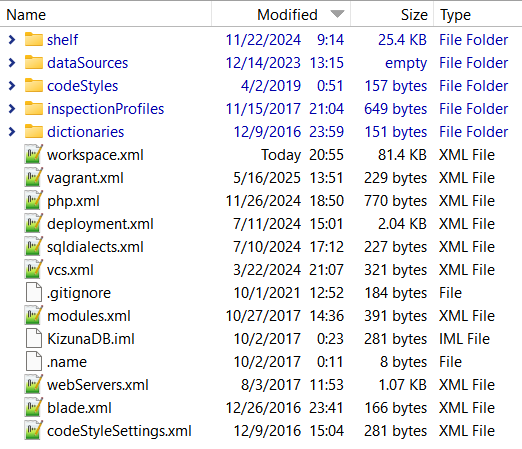
I'm not a PHPStorm power user. I use very few of its features, and I sometimes go for months without opening it (too busy with other things to work on my code), so I often struggle to find what I'm looking for in it. But what I normally need it to do was working fine until this upgrade. Surely I won't have to set up all this stuff again, hunting around the docs to figure out how.
I thought perhaps I could temporarily go back to using the older version of PHPStorm that might find the correct settings, wherever they are hiding. There is still a folder “C:\Users\karen\AppData\Local\JetBrains\PhpStorm2024.3” (as well as a similar PhpStorm2023.3). But there is no program executable in it; the only PhpStorm.exe file is in a completely different location: “C:\Users\karen\AppData\Local\Programs\PhpStorm\bin”. So that's not an option unless I risk uninstalling the new version and reinstalling the old, which might make things worse. I searched this forum and the web for clues, but I didn't find anything directly relevant.
Please sign in to leave a comment.
Never mind, I figured out that not only connections, but a lot of other settings were missing too, so I adjusted my search terms and learned that the old “C:\Users\karen\AppData\Local\JetBrains\PhpStorm2024.3” folder contains what I was missing. I don't know why it didn't import that stuff during the upgrade, but apparently others have had this problem. I followed instructions to use "File → Manage IDE Settings → Import Settings…" and navigate to the 2024.3 folder, and after restarting, it appears to be okay now.
When you opened the project, did you select 'Open', 'space waves' or 'Import Project'?
I selected “Open”. I don't know what you mean by “space waves”, and I don't see “Import Project” as a menu item.
But as I said in my “Never mind…” comment, the problem was apparently the settings, not the project. Once I imported settings (which has never before been necessary when upgrading), it knew about my projects, connections, remote server locations, databases, layout, etc. I don't know why the .idea folder has ancient connection data, but the only reason I even looked at it (for the first time ever) is because stuff wasn't working and I was trying to figure out why.