[WebStorm] Very hight CPU/Freezes

Hello WebStorm Support Team,
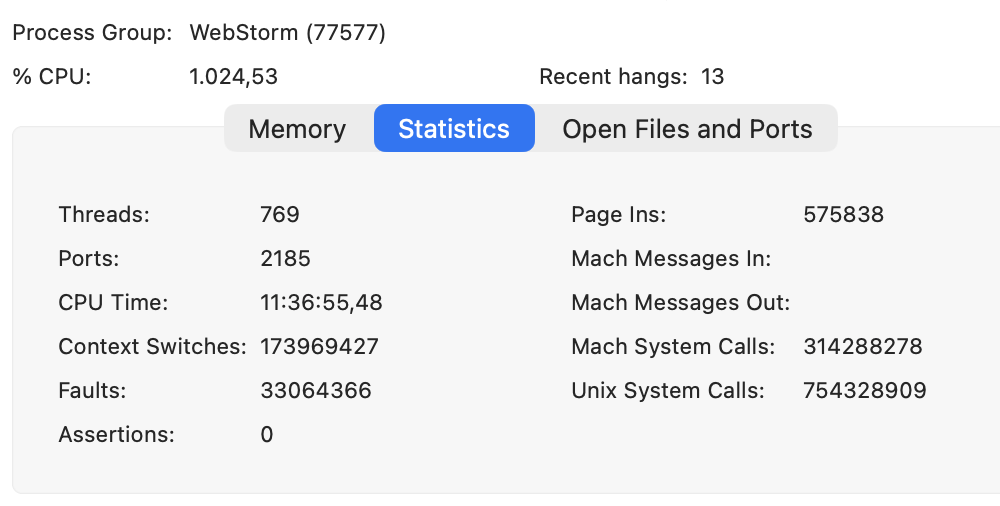
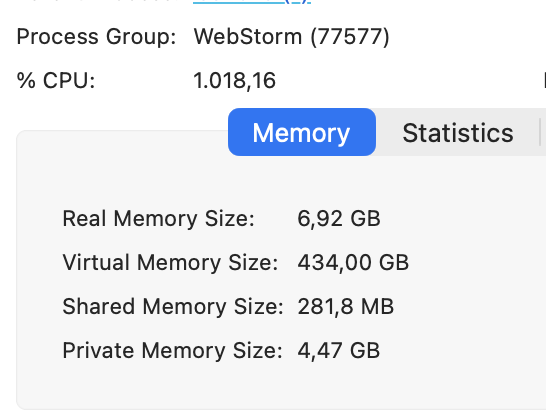
I’m experiencing severe performance issues when opening more than one project in WebStorm.
Issue:
- When I open a second (or more) project, WebStorm’s CPU usage spikes to around ~1000% (according to Activity Monitor / system monitor).
- The IDE becomes extremely slow and sometimes completely freezes during startup or shortly after.
- This happens consistently whenever I have multiple projects open.
My setup:
- IDE: WebStorm (latest stable version at the time of writing)
- OS: MacOs 26.1
- Hardware: M4 Pro / 48 GB RAM
- Plugins: minimal set (Junie + a few essentials); I intentionally keep plugins lean.
- AI Assistant: disabled for some projects to reduce load.
What I’ve already tried:
- Disabled AI Assistant for several projects.
- Reduced plugins to a minimal set.
- Restarted IDE and machine multiple times.
- Invalidated caches and restarted.
Unfortunately, none of these steps have solved the problem.
Could you please advise how to debug this or what to adjust in settings?
If helpful, I can provide logs, CPU snapshots, thread dumps, or any other diagnostics you need.
Thank you in advance for your help.
Best regards,
Kostiantyn
Please sign in to leave a comment.
Would it be possible to collect a CPU snapshot while reproducing the issue:
1) Help > Diagnostic tools > Start CPU usage profiling
2) perform the actions which are causing the high CPU usage
3) Help > Diagnostic tools > Stop CPU usage profiling
and share it along with the IDE logs (can be collected with the Help > Collect Logs and Diagnostic Data menu action) and the detailed description of your steps in a new youtrack ticket (https://youtrack.jetbrains.com/issues/WEB) so we can investigate your problem more thoroughly?
I created the tickets as you mentioned: WEB-75856
CPU Profile also was attached.
Can't find the ticket, was it resolved?
WEB-75856 has a limited visibility; it is not yet resolved.