Diff window I can't read out the file name
Answered

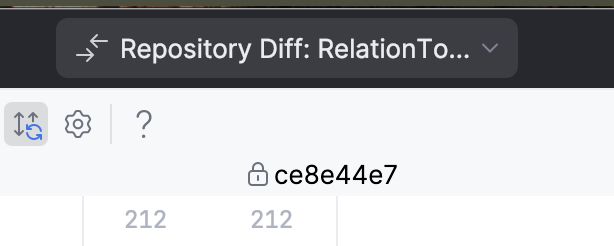
Below you can see the header of the diff window, and even hovering it just shows the same text. How to make the file name come out fully?
Please sign in to leave a comment.
Hello Mihkell ,
Thank you for reaching out to JetBrains Technical Support!
This is a known usability issue, and you can follow this YouTrack ticket to see when it’s fixed:
IJPL-100397 "Repository diff" prefix seems redundant in tab name
The complete file name should be visible in the diff view header. When hovering over the file, the name should also be displayed in full.
If not, could you please specify what IDE you use?
As a workaround, you can use the following options:
- If you select the “Show Diff in a New Tab” option, you will be able to see the full file name (as long as it’s not too long). You can also assign a keyboard shortcut to this action in Settings > Keymap > Version Control Systems > Diff & Merge > Show Diff in a New Tab or Window.
- If you go to Settings > Advanced Settings > Version Control and toggle off the “Open Diff as Editor Tab” option, all diffs will open in a separate window with the full file name visible.
Feel free to contact us if you have any questions.
Warm regards,
Elina