Adding Brave to Run Configuration for Javascript

The documentation for “Run/Debug Configuration: JavaScript Debug” (at https://www.jetbrains.com/help/webstorm/2025.3/run-debug-configuration-javascript-debug.html?reference.dialogs.rundebug.JavascriptDebugType&keymap=Windows) has the statement:
Browser || From this list, select Chrome or another browser from the Chrome family where your application will be debugged.
Is it not possible to add the Brave browser as a debugging or run tool?
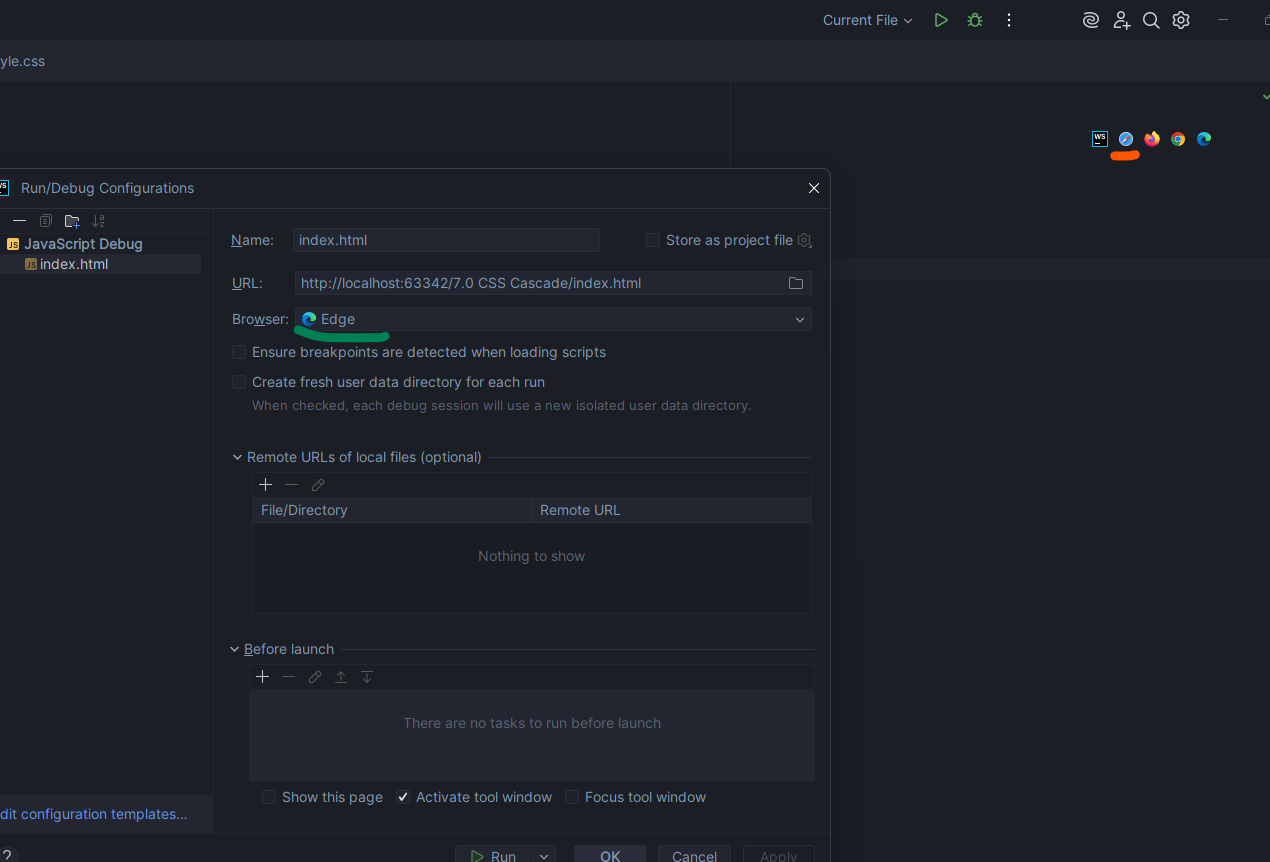
I have configured Brave to work in the upper-right side of the HTML file, so I can use it to run from there. Even then, I couldn't change the icon, so the Brave option in the upper-right corner has the Safari icon (changed the path of Safari as I'm using Windows).
1- I want to change the spot I highlighted in green, the Run/Debug Configuration, Browser option to Brave browser. But there are only Chrome and Edge browser options.
2- If you have any way to change the Safari icon I highlighted in orange to a Brave icon, I would love that too.
Please sign in to leave a comment.
In Settings | Tools | Web Browsers and Preview press + to add a new browser, make sure to choose Chrome as a Family, change Name to
Braveand specify a full path to Brave executable in the Path field; you will then be able to choose Brave browser for debugging in your Run/Debug configuration.There is unfortunately no way to change the icon. We have feature requests for adding Brave to the default browsers list with the dedicated icon: WEB-51602, WEB-60891.Please feel free to vote for them to get notified of any progress.
Thank you so much! This is the second time I sighed happily and said, “It works!” thanks to your insight. Much appreciated. (:
You are very welcome :)