Is WebStorm suppose to find previously downloaded Node installations?

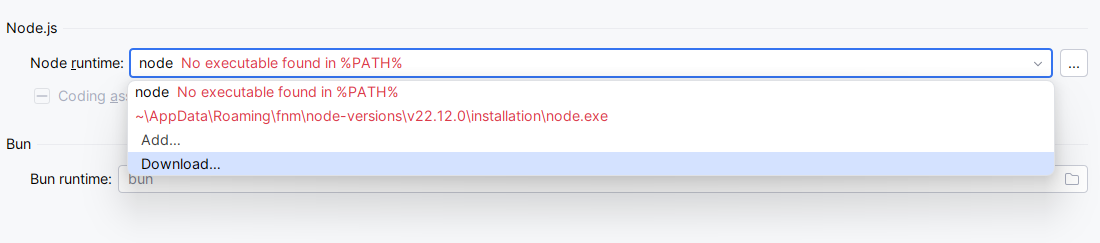
I find it odd that when choosing a Node runtime, WebStorm does not detect the ones sitting in AppData that I previously had it downloaded.
And if I try to download again, it says the folder exists (which is a great way to remind me where they are all sitting so I can copy the path and click Add Local… 😄).
Would it not make sense to scan these folders where node installations have likely been downloaded? It is convenient to let WebStorm download Node for you, but I feel this is the missing piece of integration for the download Node feature.
Please sign in to leave a comment.
In the upcoming 2026.1 release, Node.js interpreter downloaded from the IDE will be automatically added to
%PATH%, see WEB-68029. But I'd strongly recommend downloading a Node.js interpreter from https://nodejs.org/en/download/prebuilt-installer , installing it on your system and set it up as your default interpreter in Settings | Languages & Frameworks | Node.js. The auto-downloaded interpreter has a lot of limitations (not added to%PATH%, won't persist on IDE updates, etc.). Then re-start the IDE and check if there are still issues.Thank you for your reply, Elena.
At first glance, the upcoming feature you mentioned seems like it is going to pollute one's %PATH% over many installs unless the IDE is going to clean up previous entries.
And I hear you on your recommendation to just install Node myself.
It is a pity cause I think the feature is very convenient, but that's just my two cents.
It does seem like a missed convenience feature. Auto-detecting previously downloaded Node runtimes from known AppData locations would save a few manual steps and make runtime management much smoother. Hopefully it's something JetBrains considers for future improvements.