Bring GIT actions back together

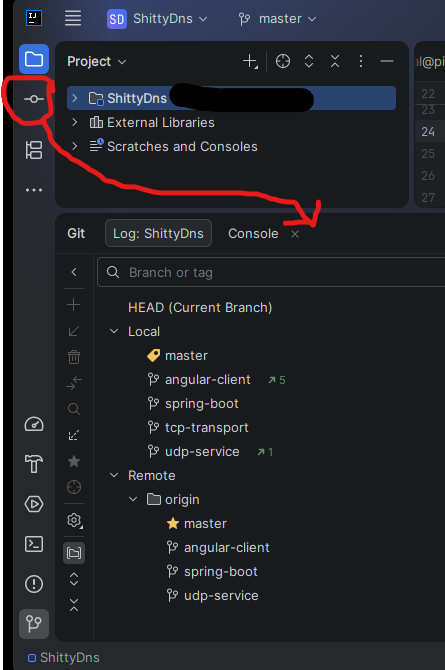
Im really missing the “old times”, when the local changes were a tab in the git-tab, and the commit UI a separate window. the design now feels wrong. on the top left, you have things like “project” and “structure”, and the “commit” tab, which imho has nothing to do with the other tabs. it doesnt feel like it belongs there, this feels kind of like VS code, just throw everything up there. why is this commit tab not part of the whole git tab anymore? it feels even more strange if you configure the commit action to be opened in a separate window, then the commit “tab”, is then an action button between “project” and “structure”. its really hard to put the emotions in here to describe what i hate with this behavior, but it also feels to me like it skips the step in my workflow where i want to check which changes i did, without thinking of commiting it at that moment. for me this design has the flavour “just commit everything without thinking”….
Please sign in to leave a comment.
Hey there,
Actually, the old commit dialog (modal one) was moved to a separate plugin, it wasn't removed completely. So the user can still re-enable it - Settings (
⌘ + ,orCtrl + Alt + S) | Advanced Settings | Version Control | Use modal commit interface for Git and Mercurial.However, it is now in maintenance mode, with no bug fixes or feature enhancements.
A different approach is to use the non-modal dialog (the new implementation), but to move it to the Git tool window, by disabling the option - Settings (
⌘ + ,orCtrl + Alt + S) | Advanced Settings | Version Control | Enable Commit tool window.Let us know if that helps, or if there is anything, please open a ticket with the support team: https://www.jetbrains.com/support/