How to restore "Open in Dolphin" menu entry?
Answered

I'm using PhpStorm 2026.1.2 on Kubuntu 24.04 LTS, installed with the Toolbox app. All of a sudden, the feature to open a file in system file browser (in my case, “Open with Dolphin”) is gone for good, and instead I see a ridiculous menu entry to open the file with the IDE itself!
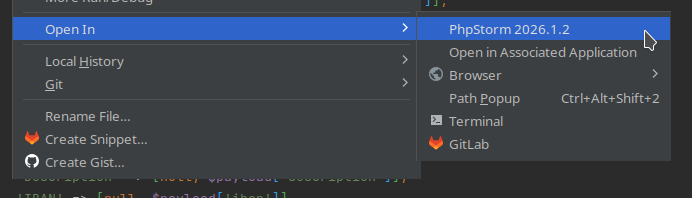
How can I get it back?
Please sign in to leave a comment.
Hi Alvaro, does it matter which file type you right-click? The Open In entry is not hardcoded; the IDE determines it dynamically by asking the system which application is registered as the default handler for the item you clicked.
Could you please run the following command in a terminal and share the output?
If the output is not
org.kde.dolphin.desktop, try running:Then restart the IDE and check whether the option is back.
For broader troubleshooting, we also have a small diagnostic script that can help identify the issue, see SUPPORT-A-1932. We are tracking related cases under IJPL-171764.
Apparently it doesn't matter, it's missing for all types I've tried.
First command's output was:
The second command fixed it. Thank you!