JetBrain's Remote Debugging Setup is the Bane of My Existence!!!

I used phpStorm a good bit around two years ago and at the time ran into a number of issues configuring the debugging - both local and remote. More recently I've had cause on a new system with a new test server etc. to use phpStorm again and I am again facing craze-inducing frustrations configuring the remote debugging.
A quick Google search will show I'm not the only one who struggles with this. The part that is frustrating me at the moment is the Validate Debugger Configuration on Web Server in which it keeps telling me "Path to the validation directory is invalid" - which is particularly unhelpful.
I have a connection to the remote server all setup, I can see it and browse it in the remote host window, but when I click on ... on the right right of Path to create validation script: I'm only shown my local machine. Why doesn't it show me the remote server? I've entered every validation path I can think of with no luck AND I've also successfully placed a file in the folder I've marked as validation path and it is showing up just fine, no 404.
:-( I like JetBrain's products but this one thing drives me absolutely nuts!
Please sign in to leave a comment.
So I've tried for the last few hours (add that to the days I have spent previously) trying to get the remote debugger working. I've finally gotten it working, here are the last perhaps 1 hr. of working and how I finally got it to do something right...but it really, really, really shouldn't be this hard. :-(
It may be caused by path mappings misconfiguration or not synchronized local and remote projects.
To figure out the problem check path mappings configuration for 'test.liquidchurch.com' server at PHP|Servers or enable Break at first line in PHP scripts option (from Run menu)." (See Image 2)
I have experienced the exact same problems, and sentiment, as the author of this post. I was able to (finally) get this working after many hours and countless times seeing the message “debug session was finished without being paused”.
I’m writing this response to help anyone who may have stumbled upon this post during (one of many) frantic and angry google sessions as I did. It IS possible to get this working.
CONFIGURATION
(my dev environment is Laravel Homestead running on virtualbox - although that fact is not necessarily specific to this problem)
First of all refer to this page as your main guide through this problem. Let’s refer to this as “The Guide”.
https://www.jetbrains.com/help/phpstorm/troubleshooting-php-debugging.html
Secondly, know that debugging from the command line is set up differently than via a browser. For CLI debugging read here:
https://www.jetbrains.com/help/phpstorm/debugging-a-php-cli-script.html
Note: An important point that “The Guide” doesn’t cover is configuring the specific xdebug settings.
You can find info about configuring these here:
https://stackoverflow.com/questions/27936323/debugging-laravel-artisan-from-phpstorm-with-homestead
And a list of all the settings here:
https://xdebug.org/docs/all_settings
One notable difference here between Web and CLI configurations is you want xdebug.remote_autostart=true on CLI because CLI debugging session cannot start with a header variable like web does.
If you’re as angry as I was, you might be thinking “hey thanks for the sweet info but WHERE TF do I set these up?”. Well, in my VM (laravel homestead as I mentioned) which is Ubuntu 18.04 running nginx you’ll find the php.ini files here:
CLI: /etc/php/7.4/cli/php.ini
Web: /etc/php/7.4/fpm/php.ini
Personally, I set the xdebug config at the very end of the file.
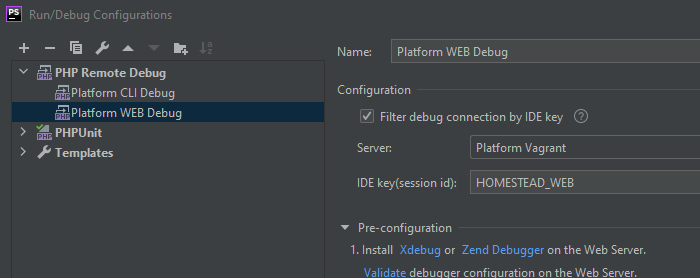
I also set up a debug profile for both CLI and Web, that listen for a specific key.
One note about Laravel CLI specifically, sometimes I like to set a breakpoint in the artisan file at the end before it terminates. You can then use the console window of PHPStorm similarly to how you use tinker -- except this way you get autocomplete and can view the content of the variables in the debugger.
MAPPING
Lastly, the thing that drove me the most insane was the session not being paused, never finding the breakpoints, and leaving you with the single option of breaking on the first line. If in the debug console you see it say “connected” while your page loads but it never breaks and/or you just get the hated ‘session did not pause’ message. You probably have a mapping issue.
One might think that if you’ve got your ssh connection set up the IDE could detect the mapping for you, OR if you map the project folder all of the files & directories within could be determined by the IDE, but in my experience this doesn’t happen.
You have to manually map each file for the IDE to break on the breakpoints within.
Tip: if you have breakpoints that are being missed put the function xdebug_break() next to them. When the IDE breaks there there will likely be a message saying that that file is incorrectly mapped, at which time you can correct it.
I hope this helps save people time!