Docker PHP interpreter doesn't work via docker-compose

PHPStorm 2018.1
docker-compose version 1.8.0, build unknown
Ubuntu 16.04
Docker version 1.13.1, build 092cba3
I have a project for docker-compose configs. The fpm section looks like this

The projects works pretty good.
PHP scripts run nicely via containers' bash sessions
I tried to be able to run scripts via Phpstorm GUI, you know:

Firstly I created a new interpreter setting

Path mappings looks fine

At Server section I set up mappings too. I'm not sure it is really necessary:
Now, we are ready to test the remote interpreter!

And... it fails:

Trying to do it several times I noticed every time a new container is being created. Why?

May be this is the reason of failing?

Why does phpstorm ignores a running container?
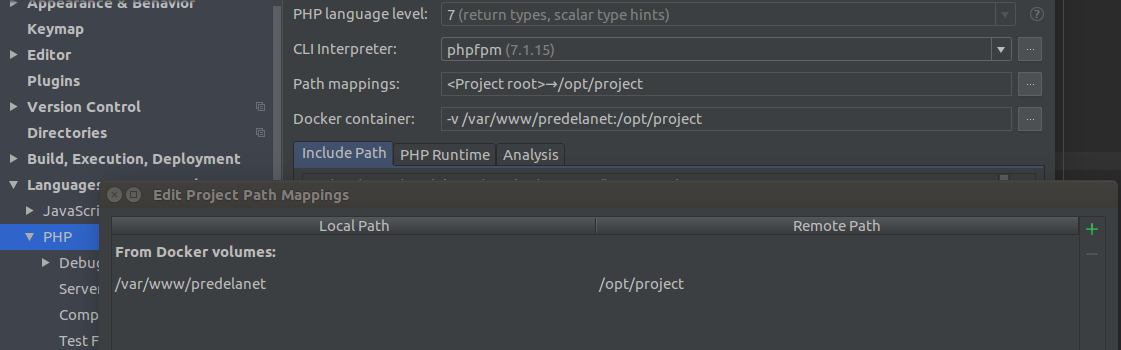
When I use Docker container (not compose) as remote interpreter, all works fine:

By the way: what is the string in Path Mappings means? What is /opt/project? I never set it, but it works (even xdebug)


Please sign in to leave a comment.
I have the same issue, my tests just hang but I do think they have already finished executing in another run_# container.
Update: as a workaround until its patched, create an interpreter using "Docker" instead of "Docker Compose" after starting docker-compose normally.
Creating an interpreter via Docker (not compose) works fine, but none of hostnames is resolved and I can not access DB, for example.
Same issue here. Is this already reported as bug?
Yep
https://youtrack.jetbrains.com/issue/WI-41367