No git 'Commit' button for git after moving from Windows to Linux Mint

Hi,
I recently moved from Windows to Linux Mint and installed PhpStorm and then imported the settings etc.
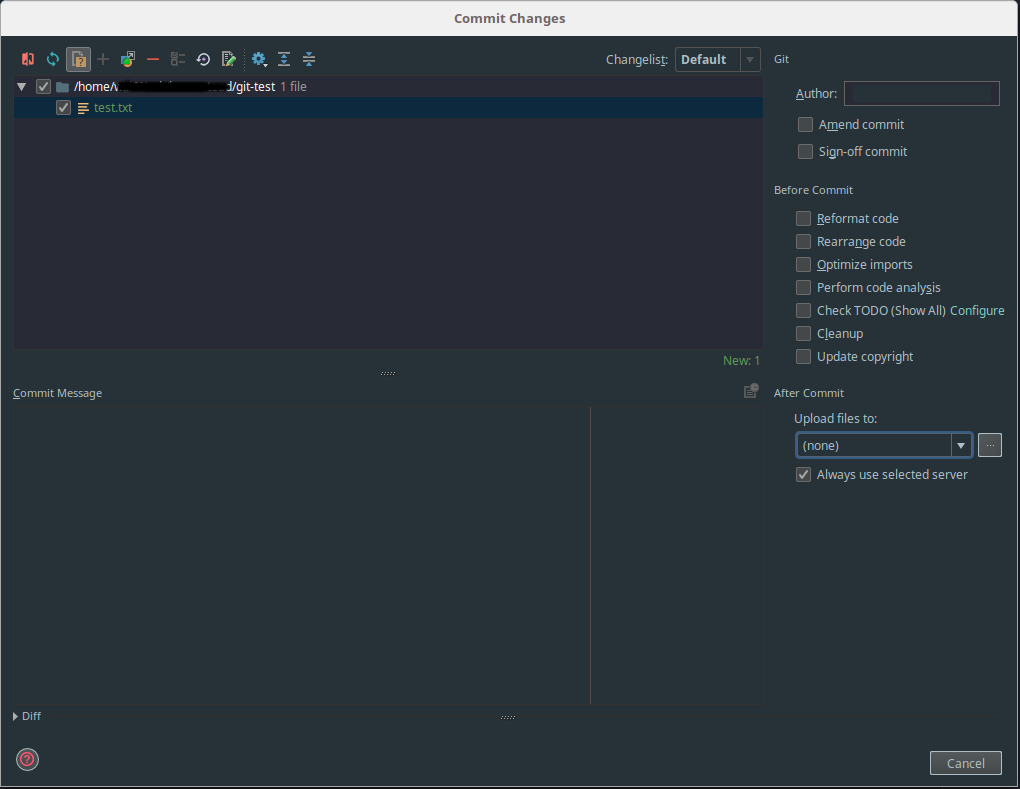
Everything appears to be working perfectly except when I go to commit changes. The button to press is simply not there, only the cancel button is available to click. (Shown in the below screenshot)
I tried creating a new directory and then doing git init but that doesn't work either.
I am still able to commit and push changes to remote branches perfectly when using the terminal so I have no idea why the button is simply not being displayed.
I have tried changing the version control settings and restarting many times but nothing works.
Any help at all would be greatly appreciated as I miss being able to commit and push changes from within PhpStorm.
Thank you
Please sign in to leave a comment.
Hi there,
Looks similar: https://youtrack.jetbrains.com/issue/WI-41399
Thanks a lot! The problem was solved by disabling the custom plugin "Material Theme UI"
No idea why it was causing this issue but disabling it and restarting PhpStorm sorted it.