IDEA Ultimate 2018.1.6 and Spotlight are not friends. 100% CPU consumption on each simple action!
Answered

Hi,
MacOS High Sierra version 10.13.6. MacBook Pro Mid 2014 (2.8 GHz, 16Gb)
Java version "1.8.0_121". Apache Maven 3.3.9. J2EE project (WildFly). Around 2000 java files.
Each simple action like building project (without tests), switching between sources/tabs, jumping through classes and etc. leads to 100% CPU consumption and hangs on several minutes.
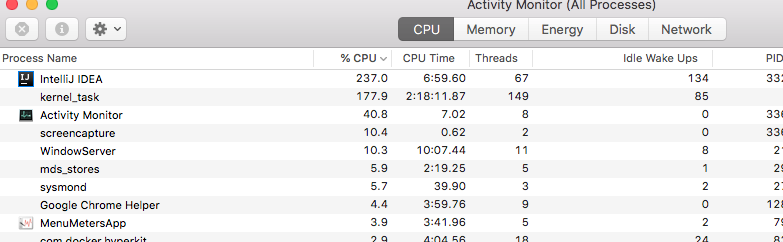
Has anyone come across this?
Please sign in to leave a comment.
I found the guilty one - it was Spotlight!
For unknown for me reason it starts its magic each time when I start doing something in IDEA. Any more or less complex action in IDEA (like I described above) - and boom! - 100% CPU consumption and please wait several minutes until it calms down.
What I did - I just disabled that "smart" tool FOREVER. Now everything works smoothly.
Нope this will be useful to someone :-)
I have this problem too, and even after disabling Spotlight the problem persists.
Before upgrading to 10.13.6 (17G65) I had no problems, but after the update the problem started occurring in all my installed JetBrains products (IntelliJ, PyCharm and WebStorm). The size of the projects doesn't seem to matter as I'm having this issue with a project of 20 files.
I also tried removing cache, removing preferences, reinstalling application without any luck.
It's so severe that I cannot work with any of these IDEs. Please help.
Hello,
Please report new issue on YouTrack attaching logs folder zipped ("Help | Show Log in...") and CPU snapshot (https://intellij-support.jetbrains.com/hc/en-us/articles/207241235-Reporting-performance-problems): http://youtrack.jetbrains.com/issues/IDEA.
Done, thanks Yaroslav!
https://youtrack.jetbrains.com/issue/IDEA-195652
Thanks!