IDEA 2018.1.5 gradle problem
Answered

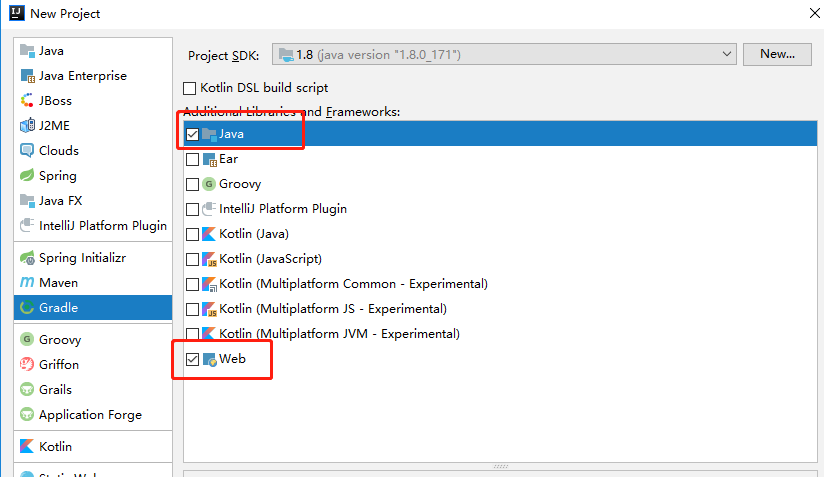
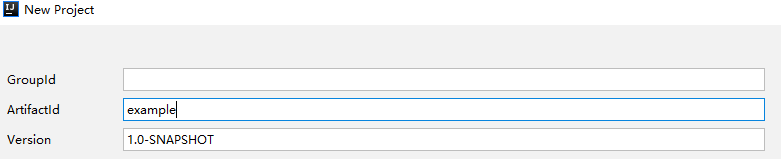
I create a new gradle project in IDEA like this:

Everything went well when I finished creating:

However,when I added a tomcat server to the project and I closed and reopened IDEA, I found the project lost gradle support.

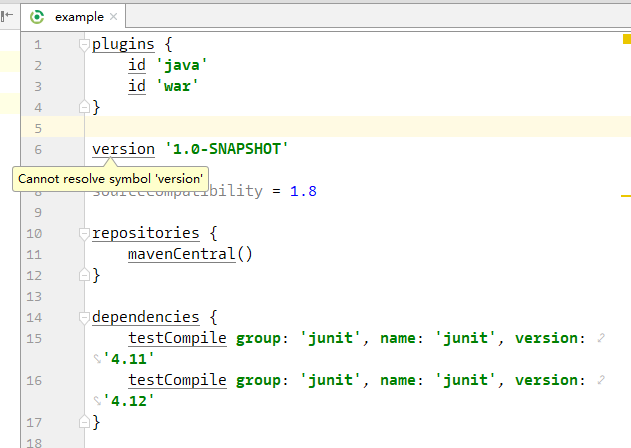
The symbol in build.gradle cannot be resolved and the web facet added automaticly and the two artifacts added by gradle were both lost.
What happened to this project and how can I solve this ?
Please sign in to leave a comment.
Hi. What do you see in a gradle window (View | Tool Windows | Gradle)?
Thank you for your response.
The gradle window seems normal. And the settings (Build,Execution,Deployment | Build Tools | Gradle) looks just fine.
The facets and the artifacts were empty in the project structure.
I tried to attach another gradle project, then the facets and the artifacts came back and IDEA could resolve symbols in build.gradle. But I found two gradle projects in settings (Build,Execution,Deployment | Build Tools | Gradle). When I reopen IDEA, the same problem just comes out again and I need to attach another gradle project to solve that.
Does it help if you refresh Gradle project?
https://www.jetbrains.com/help/idea/gradle.html#gradle_refresh_project
Refreshing Gradle project does not help. But I think maybe I find the cause of the problem.
When I created the new Gradle project named 'example' before, IDEA set the project location as 'D:\\example' defaultly.(My operating system is Windows 10)
After I modified the location to 'D:\example'(only one slash), the former problem never happened.
I'm not sure if the project location is the real reason of the problem. Thank you for your attention @Petr Rastegaev.