[PyCharm] Code inspection freezes indefinitely
Answered

Since this morning PyCharm code inspection doesn't work, with no apparent change from my side.
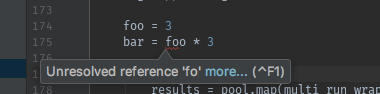
When I made a code mistake, the error highlight remains indefinitely after fixing (see attachment, as an example).
What I tried:
- update PC (after problem) -> didn't solve
- invalidate caches / Restart ... -> didn't solve
- remove workspace.xml -> didn't solve
- rename file -> didn't solve
Any help is very much appreciated.
Stefano
Please sign in to leave a comment.
After applying a long and tiring bisection of my code, I managed to track it down to a single line.
That line had no syntax error whatsoever, but after removing and re-writing it the problem disappeared.
Does anyone have an idea of what happened? Could it be a weird character from copy and paste which didn't appear in the editor?
It would be great to understand what happened.
Thanks,
Stefano
UPD: Stefano also contacted Pycharm support, we found an exception in his log file that caused the problem and created the corresponding issue about it: https://youtrack.jetbrains.com/issue/PY-29936.