Noob issue with pip upgrade (says it is current but shows wrong number)

I am *very* new to Python (less than a week). I started out with some tutorials using IDLE and have now moved on to PyCharm (18.2) - which is awesome! I am writing a test project trying to use geocoder. I created a new project in a virtual environment (all through the PyCharm IDE). I typed "pip list" in the Terminal window of PyCharm. It showed the warning for having Pip 10 but 18 was avaialble and that I should consider upgrading. Before I did that I ran the code to install geocoder. When that was successful, I tried the pip upgrade command. It crashed (a bunch of red lines). I closed PyCharm, relaunched and ran it again. It said it was successful.
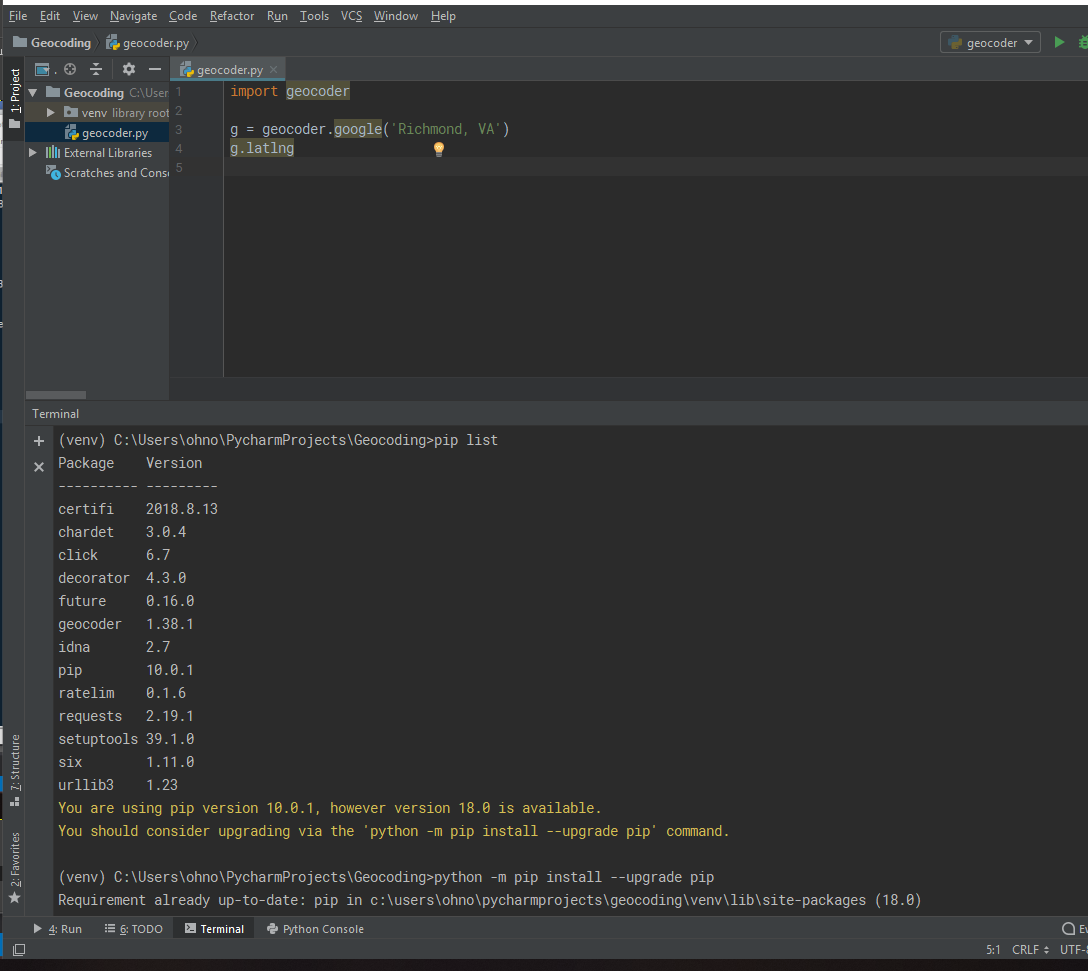
However, when I run pip list it still shows version 10. But when I try to run the upgrade pip command, it says it has the latest version (18). I am including a screenshot. I think this has something to do with it being in a virtual environment but I am not sure. What did I do wrong? As this is only my second project with PyCharm (and first with a virtual environment), I am ok if I need to uninstall/re-install. But I am hoping there is an easier, more obvious solution (especially to my complete noob eyes).
Thank you for any assistance you can give.
Please sign in to leave a comment.