Code marked as undefined or unused

I have problem with latest PHPstorm that markings are not set on code correctly, like unmarks defined vairables or unused
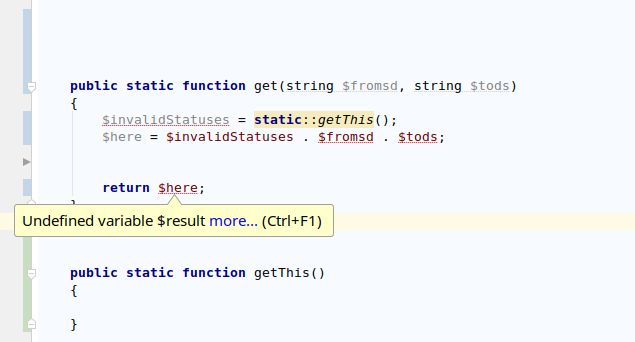
This happened after I installed ubuntu 18.04 from scratch, invalidating cache, syncrhronize, restart of phpstorm or restart of ubuntu doesnt help
DISTRIB_ID=Ubuntu
DISTRIB_RELEASE=18.04
DISTRIB_CODENAME=bionic
DISTRIB_DESCRIPTION="Ubuntu 18.04.1 LTS"
PhpStorm 2018.2.2
Build #PS-182.4129.45, built on August 22, 2018
JRE: 1.8.0_152-release-1248-b8 amd64
JVM: OpenJDK 64-Bit Server VM by JetBrains s.r.o
Linux 4.15.0-33-generic
Get this error aswell when starting phpstorm:
07:21 Can't analyse webpack.config.js: coding assistance will ignore module resolution rules in this file.
Possible reasons: this file is not a valid webpack configuration file or its format is not currently supported by the IDE.
Error details: Encore.addLoader() cannot be called yet because the runtime environment doesn't appear to be configured. Make sure you're using the encore executable or call Encore.configureRuntimeEnvironment() first if you're purposely not calling Encore directly.
But that I got when using Ubuntu 16.04 aswell and there the code marking worked
Please sign in to leave a comment.
added idea log here https://drive.google.com/open?id=17X_f6aVrTy_26Bra7tX35DSNd5hWxEn2 as it seems to be putting out error
Could you please run Help > Compress Logs and Show in ... and upload anywhere resulting archive?
here you go
https://drive.google.com/open?id=1IiU03AJJ9d39JPfko3zV9cXe1v876NY7
Thanks. Please try to delete existing PhpStorm installation, then install it again & check the issue.
If it reoccurs: please check the issue on another project.
If it happens with another project - please upload a new "Compress Logs and Show in ..." archive for us again.
Ok, did delete it, was using toolbox, then didnt import old settings, now it seems to work