Cannot create express app in webstorm because of "please specify npm or yarn package".

What should I do to solve this problem? I've been searching the Internet for a solution for quite a long time but still cannot find a solution that really works. I think this problem has been bothering some webstorm users for ages.
One proposed a solution in overstack - to fill in the npm package field in the figure 3 shown below. I've tried to do so but it turns out that I do not even have such a field to fill.
My webstorm is running on Unbuntu.
The first two figures are mine, which doesn't have the field - npm package. The third is proposed by the guy in overstack.
 figure 1.

figure 2
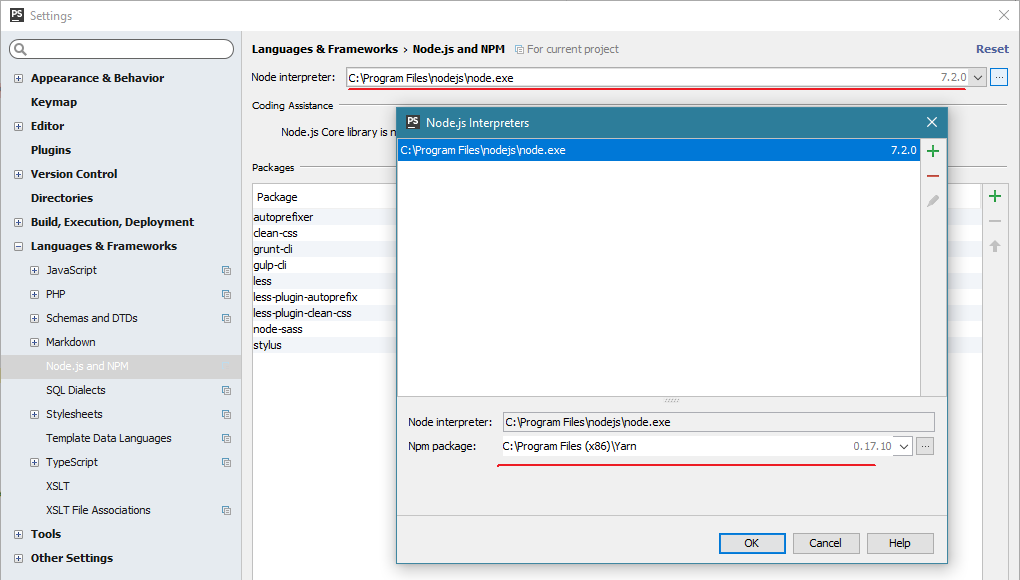 figure 3
Hope someone can help us, thank you!
Please sign in to leave a comment.
Package maneger: in File | Settings for new projects | Languages & Frameworks | Node.js and NPM is a right field... Do you have problems after specifying your npm path there? if yes, please can you provide your idea.log(https://intellij-support.jetbrains.com/hc/en-us/articles/207241085-Locating-IDE-log-files)?
My problem is that I can never create an express project even though I've already set the right path for the NPM manager. The create button is grey forever !! As is shown below pointed out by the red arrow.
please can you provide your idea.log(https://intellij-support.jetbrains.com/hc/en-us/articles/207241085-Locating-IDE-log-files)?
Here is my log created from an empty(non-express) App:
[Edited: log is cut for thread readability]
...
2018-09-13 14:01:04,756 [ 75541] WARN - r.local.NodeJsLocalInterpreter - Failed to run 'npm config get prefix'
com.intellij.execution.ExecutionException: Please specify npm or yarn package
at com.intellij.javascript.nodejs.interpreter.local.NodeJsLocalInterpreter.invalidNpmPackage(NodeJsLocalInterpreter.java:417)
at com.intellij.javascript.nodejs.interpreter.local.NodeJsLocalInterpreter.getValidNpmCliJsFilePath(NodeJsLocalInterpreter.java:392)
at com.intellij.javascript.nodejs.interpreter.local.NodeJsLocalInterpreter.getValidNpmCliJsFilePath(NodeJsLocalInterpreter.java:375)
at com.intellij.javascript.nodejs.interpreter.local.NodeJsLocalInterpreter.getValidNpmCliJsFilePathOrDetect(NodeJsLocalInterpreter.java:337)
at com.intellij.javascript.nodejs.interpreter.local.NodeJsLocalInterpreter.doFetchConfigPrefix(NodeJsLocalInterpreter.java:318)
at com.intellij.javascript.nodejs.interpreter.local.NodeJsLocalInterpreter.lambda$fetchConfigPrefix$2(NodeJsLocalInterpreter.java:285)
at java.util.concurrent.FutureTask.run(FutureTask.java:266)
at com.intellij.openapi.application.impl.ApplicationImpl$1.run(ApplicationImpl.java:314)
at java.util.concurrent.Executors$RunnableAdapter.call(Executors.java:511)
at java.util.concurrent.FutureTask.run(FutureTask.java:266)
at java.util.concurrent.ThreadPoolExecutor.runWorker(ThreadPoolExecutor.java:1142)
at java.util.concurrent.ThreadPoolExecutor$Worker.run(ThreadPoolExecutor.java:617)
at java.lang.Thread.run(Thread.java:745)
...
Thanks, the issue with "Please specify npm or yarn package" is reproduced for me on Ubuntu. Please follow https://youtrack.jetbrains.com/issue/WEB-34814 for updates.
Will be fixed in WebStorm 2018.3.