Getting Unit tests running
Answered

I have Problems in running Junit test from the IDE.
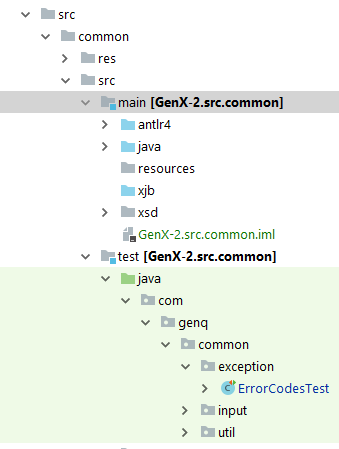
- I have a multi-module Project, each module has ist own main and test directories (see screenshot 1).
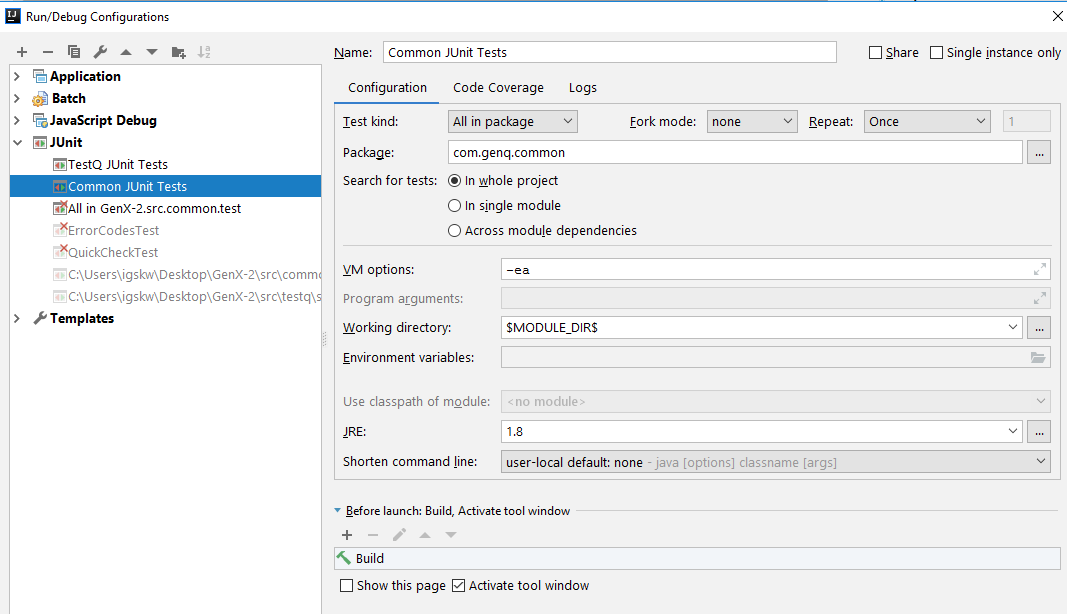
- My run-configuration is as in screenshot 2.
- All I get is a message "No Tests were found". Sure, this is an easy one - however I cannot see it... Any idea?
Thanks in adavance, Walt
Please sign in to leave a comment.
Hello Walter,
What IDE and JUnit versions do you use? Is it possible to provide full output and build script (pom.xml or build.gradle)?
Ultimate 2018.2.6 and JUnit5.
Using maven, the tests are running. However, I wanted to start them using the IDE itself (having a configuration for each module I got).
When I click on test (packages) or even on test class (below left), I get a "no tests" were found, altough my test classes do have methods with a @Test
Might it be the classes do not get compiled when I "Rebuild project" - while I can find the Java .class file from the normal classes, I cannot find the test classes.
Walter,
Could you please check the issue with IDEA 2018.3 RC2: https://www.jetbrains.com/idea/nextversion/ ?
I tried several ways, incl. updating, invalidating Cache, removing the test configs and starting again - always the same: the IDE does not detect any test; while running them under maven there is no Problem.
So, for the time being, I can use maven however would be lucky to run the Tests directly in IntelliJ. Any Suggestion welcome.