commitments.php name breaks PHP syntax highlighting

Hello everyone,
here's an interresting one:
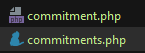
when I name a file commitments.php the syntax highlighter does not recognize php anymore and changes the file Icon also.
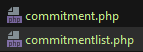
As soon as I rename the file to something else it goes back to normal.
Does anyone have an Idea how I can fix that in the configuration?
So far I am pretty clueless and could not find anything in the Preferences that would help me. Unfortunately I cannot decypher what type of file the icon is supposed to be (cat maybee?)
Thanks and kind regards,
Patrick
Please sign in to leave a comment.
You have this file associated with some specific file type (the one with cat(?) icon) at File | Settings | Editor | File Types. Try to search for that file type and remove the file name from associated list.
Thanks alot!
The file for some reason was associated with yarn.
Never used yarn and did not configure anything in that Menu yet. Maybee I misclicked on the file in the Project browser or didnt read properly during file creation.
Anyways the issue is fixed.
Thank you for your quick reply! :)
Regards
Patrick