Adding fake literals for template languages

Hello everyone, I'm writing here because I have encountered a problem that I would like some input on.
I'm currently developing a language plugin for a template language which can be embedded into any type of data language. My implementation follows that of this tutorial fairly closely, so I'm using a MultiplePsiFilesPerDocumentFileViewProvider to provide two PSI trees. For the template data elements of my language, I'm returning TemplateDataElementType objects. I've noticed that while it works nicely for HTML, I get problems with other languages such as JSON. Take for example the following JSON document:
{
    "my_key": "my_value",
    <% MY_KEY %>: "my_value2"
}
As the JSON parser doesn't see <% MY_KEY %>, it gets confused and treats "my_value2" as the key for this property. However, I've noticed that the docs of TemplateDataElementType suggest adding fake symbols to the template data source code to make the JSON parser happy, which are then removed again using RangeCollector. Thus I extend TemplateDataElementType and override TemplateDataElementType#createTemplateText, adding "fake_literal" in place of my template tokens. The implementation looks something like this:
@Override
protected CharSequence createTemplateText(@NotNull CharSequence sourceCode, @NotNull Lexer lexer, @NotNull RangeCollector rangeCollector) {
    StringBuilder result = new StringBuilder(sourceCode.length());
    lexer.start(sourceCode);

    while (lexer.getTokenType() != null) {
        final TextRange curRange = TextRange.create(lexer.getTokenStart(), lexer.getTokenEnd());
        if (lexer.getTokenType() == TEMPLATE_DATA) {
            appendCurrentTemplateToken(result, sourceCode, lexer, rangeCollector);
        } else {
            // This is the part I hacked in -- add "fake_literal" in place of <%... tag
            if (lexer.getTokenType() == TAG_OPEN) {
                String fakeText = "\"fake_literal\"";
                TextRange fakeRange = TextRange.create(lexer.getTokenStart(), lexer.getTokenStart() + fakeText.length());
                result.append(fakeText);
                rangeCollector.addRangeToRemove(fakeRange);
            }
            rangeCollector.addOuterRange(curRange);
        }
        lexer.advance();
    }
    return result;
}
The resulting JSON looks like this:
{
    "my_key": "my_value",
    "fake_literal": "my_value2"
}
This works just fine, and generates exactly the structure I want. However, once "fake_literal" gets removed again by RangeCollector, it is also removed from the PSI tree, leaving an empty JsonStringLiteral which is 0 characters long. This in turn causes JsonLiteralAnnotator to fail and throw, since it expects String literals to be non-empty. Below is the new PSI tree after being processed:
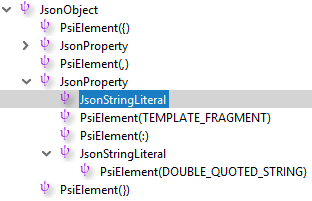
Clearly, this is a problem, since it means this solution may fail with any language extension I don't know about. Since the templating language is supposed to be embedded into any language, not just JSON, I want to avoid language-specific hacks as much as possible. I'd like to know if I am overlooking something about RangeCollector, or if this approach is simply not suitable to what I'm trying to do. If it isn't, what alternatives are there? Any help is greatly appreciated.
Thanks
-JP
Please sign in to leave a comment.
RangeCollector currently affects only lexer, and is supposed to be used in cases when you have a very good guess what kind of text the templating engine will produce in the specific place. So this is mostly useful when you know which data language you're targeting, and what will be inserted. In a general case, you can only guess, because the template engine can insert just anything, as crazy as it could be. E.g. in JSON it could be the second half of the key, the colon, and the first half of the value.
So I'm afraid there's no general magic solution. To avoid highlighting issues, we generally suppress all errors/warnings produced by highlighting in the template data file, by using HighlightErrorFilter/HighlightInfoFilter extensions.
Ah, thanks Peter!
It's a shame that RangeCollector won't work for me, but it's not a huge deal. HighlightErrorFilter very much seems to be the way to go.
Cheers