Accessing variable content displayed from debugger in PHPStorm

I am a defector from another IDE and really liking PHPStorm. However, I have not located a comprehensive source of documentation for symbology...
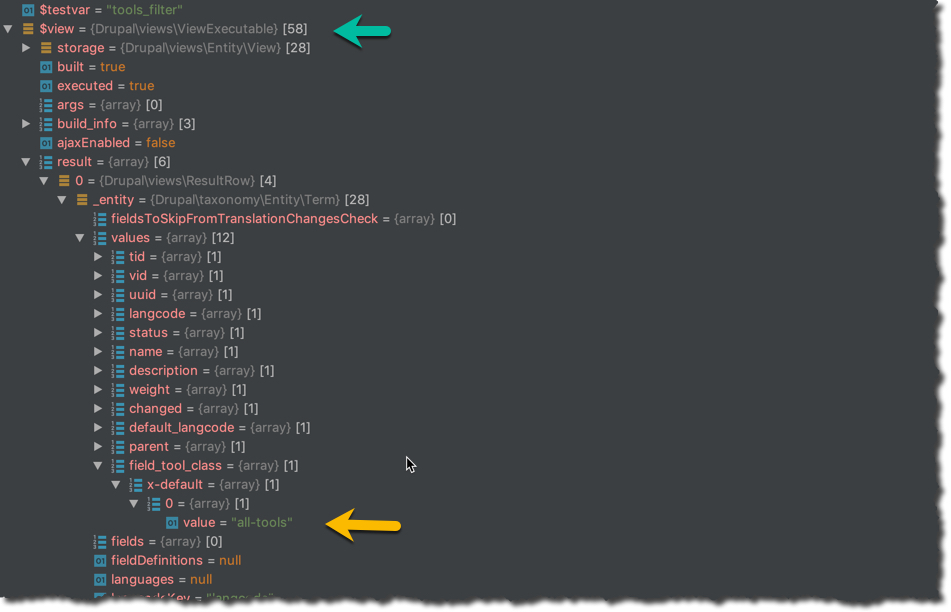
In the screen shot below, I've cut the results of debugger.
At the green arrow, there is a reference to $view. Because I "know" that $view is an object, I deduce that hamburger symbol implies objects.
Going down further, there is value that I want to access within my php code...
How, given the tree shown would I do that?
It seems that it is buried within $view/storage/result[0]......field_tool_class
Please sign in to leave a comment.
Icons are described in our Web Help: https://www.jetbrains.com/help/phpstorm/debug-tool-window-variables.html#icons
Neither. As I mentioned in the question, I found the values in the debugger-
However, apparently one can not always just follow the path and assign the value to variable in code.
Is there a way to discover what methods(functions) one might use to access a value buried in a method or object?
You can either right-click the value and choose to Set Value, or if you need to do that in the code specifically, use Copy Path from the right-click menu.