Autopopup on CTRL + mouse over

Hi all,
I want to extend a plugin I wrote to have the same behavior as the CTRL + mouse over on variables.
The company I work for is using it own way of handling translations (i wished they used I18n... but that's another topic)
All translations are always of a specific class, let say MyTranslation with names in form MY_TRANSLATED_KEY_TXT
(note that all keys always end with _TXT)
and the translation value is located in a file with a speficic extention in the same folder as the java file.
so basicly my idea was to somehow make an autopup appear that displays the translated text like intellij would do with normal I18n translations.
The logic should be like that
take the name of the element bellow the mouse and check if it matches a specif regex (easy)
optional maybe check also that the name is an instance of right class (i managed to get the psiElement under the caret but have no idea how to get the class of the variable.. )
if it is the case, read the translation from the file (the key is the same as the selected name) (should not be a big issue)
and finaly popup the translation like it is done for i18n
Unfortunately I have no idea where to look for this last part. Any clue or code example I could use ?
Of course currently if i do CRTL + hover on the translation key, it shows me where it is instanciated, as this is java code :/
Please sign in to leave a comment.
A simple version would be (if I understand the setup correctly) to provide com.intellij.lang.documentation.DocumentationProvider#getQuickNavigateInfo that works on such field references and simply performs resolving to the real key -> real value in this method. see http://www.jetbrains.org/intellij/sdk/docs/reference_guide/custom_language_support/documentation.html
I did following
but now I need to tell IntelliJ to use my own JavaDocumentationProvider, that of course will do the same as the defaut one if it is not a company class translation.
I modified my plugin.xml,
but none works :/
The first gives me an exception, and the second one does not change anything
if you have any more help I would really appreciate it :)
Best regards,
Alain
Please add order="first" to your registration of "<lang.documentationProvider ..." in plugin.xml. This will make sure your provider is tried first before that "regular" Java one.
You're amazing thanks a lot :P
By the way, is it possible to do the same within javadoc ?
Indeed in the company I work for, we are using shortCode as author and i wanted to have the same possibility on the author value to display informations about the user (full name, phone, mail)
I put a breakpoint on the getQuickNavigateInfo but it does not seems to go in
Any way of doing that ?
Best regards,
Alain
Yes.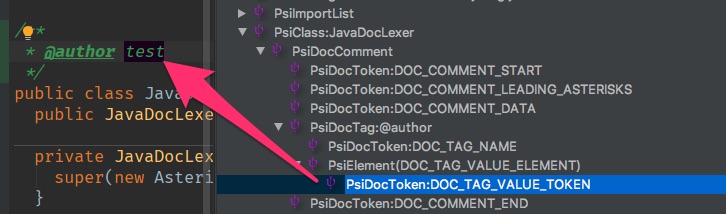
Thanks again for your answer.
In fact I already saw that there are psi Element in the javadoc and I can indeed read the value.
But the issue is that for javadoc, the getQuickNavigateInfo is not called .
I put a breakpoint at the begining of the method and it never entered .
Do I need som further change in the plugin.xml ? Or maybe change a setting in IntelliJ in order to get the QuickNavigateInfo ?
Just for information I implemented something else : a right click menu that gives me the author further information.