How to set up Webstorm with ESLint and Prettify to ensure formatting sameness between members of a team that also uses VSC?

I'm part of a team where we need to ensure that the code between all of us is formatted the same.
I've got a basic understanding of ESLint and Prettify and have setup WebStorm to use both.
One issue I'm having is that when I 'correct ESLint errors' through WebStorm, the formatting ends up different (in terms of whitespace) than when I run 'prettify'. So the formatting depends on which I run first.
The second is that I'd like to have this all done automatically, on save. I have searched and found various instructions on how to do this, but in light of the above, I'm not sure how best to run ESLint and Prettify to make sure that the code is consistently formatted.
Finally, 2/3 of the team is using VSC, so I'm wondering how we can all work together to keep the code the same. That is, do we just set up our '.rc' files to be the same, and then each of us does what his/her IDE requires to enforce format on save?
If there's a link that explains all the issues above, that would be great. Thanks for any help.
My .eslintrc is
{
  "extends": ["airbnb-base", "prettier"],
  "plugins": ["prettier"],
  "env": {
    "node": true,
    "mocha": true
  },
  "rules": {
    "comma-dangle": ["error", "never"],
    "global-require": 0
  }
}
and my .prettierrc is
{
    "useTabs": true,
    "printWidth": 140,
    "tabWidth": 2,
    "singleQuote": true,
    "trailingComma": "none"
}
Please sign in to leave a comment.
>One issue I'm having is that when I 'correct ESLint errors' through WebStorm, the formatting ends up different (in terms of whitespace) than when I run 'prettify'. So the formatting depends on which I run first.
I'd suggest disabling all ESLint rules related to code formatting, as it's recommended in https://github.com/prettier/eslint-plugin-prettier#recommended-configuration, and only use ESLint for formatting (i.e. run
eslintwith the--fixflag to format your code) - it will format your code according toprettierstyle.>The second is that I'd like to have this all done automatically, on save. I have searched and found various instructions on how to do this, but in light of the above, I'm not sure how best to run ESLint and Prettify to make sure that the code is consistently formatted.
If you need to run
eslint --fixon Save All, set it up as a file watcher in the IDE, and disable immediate synchronization ( Auto-save edited files to trigger a watcher in watcher settings) for this watcher, so that it's triggered on explicit Save All/changing focus:>That is, do we just set up our '.rc' files to be the same, and then each of us does what his/her IDE requires to enforce format on save?
yes, exactly
Elena Pogorelova
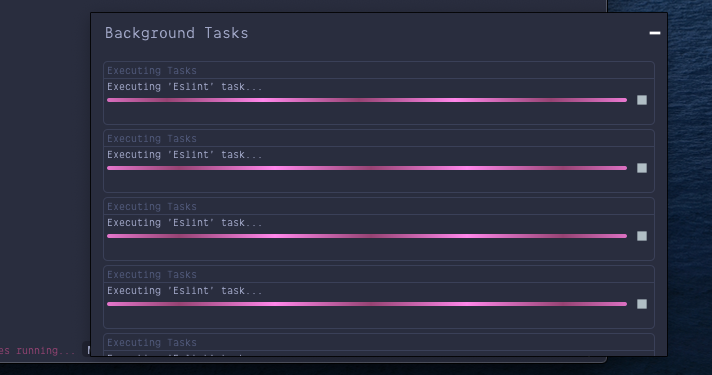

It works but it run the fix command not only in the current file but also in other files. Do you know why this behavior?
I'd like to run the fix only in the file opened that I just saved...
Actually I can see 7 tasks in background:
This is my config
Must be https://youtrack.jetbrains.com/issue/WEB-39699, please follow it for updates
Many thanks
I started to watch it
Seems the issue has not been fixed yet
It's very annoying
it kill the coding speed