Customise the folder apparence in the project view

Hello everybody!
In the Project view when I mark a folder as Excluded these appearance is more visible than a resource root one.
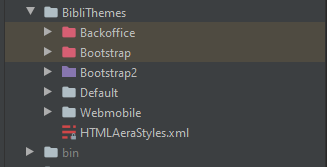
Where can I customize the background and the color of the icon?
Thank you for your help.
Please sign in to leave a comment.
Are you using a custom IDE theme? See https://blog.jetbrains.com/idea/2019/03/brighten-up-your-day-add-color-to-intellij-idea/, http://www.jetbrains.org/intellij/sdk/docs/reference_guide/ui_themes/themes_customize.html for details about customizing the UI themes
Hello Elena,
No I only use Atom Material Icons https://plugins.jetbrains.com/plugin/10044-atom-material-icons/ who (I think) dont modify the colors of regular folder as I show in my screenshot.
i'll read the links you provide and I keep you in touch ;)