CLion kotlin native deploy and debug on raspberry pi

I have created a default Hello world project skeleton (kotlin native) to try and see if I am able to do full remote development like C/C++. I set build.gradle.kts to use linuxArm32Hfp (Raspberry Pi). I have also set default toolchain to point to RPI toolchain.

I have also set the deployment configs and mappings:


I am able to cross compile, build, deploy and run code directly on RPI, this is screen of IDE running the app and console showing same path on RPI.. the app executes fine on RPI.

the problem comes when I try to debug this code against remote executable, using remote GDB, the break point is grayed out and never gets hit, just acts like I ran the app instead of debug.
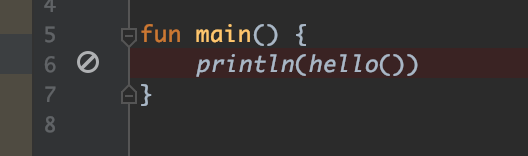
on the other hand, if I switch to lldb as debugger , it just hangs for a while then I get error that command timed out.
any pointers and help is really appreciated.. would love to be able to cross compile and debug on remote or even better do full remote with kotlin native from Clion just like what is currently available to C/C++.
thanks,
Bilal
Please sign in to leave a comment.
This works for me (CLion 2020.2.5, Kotlin 1.4.0):


