LineMarker TooltipText HTML Table extra column
Answered

I set up some LineMarker to display help information for tags,
Made many attempts and found that NavigationGutterIconBuilder # setTooltipText () can parse Html text,
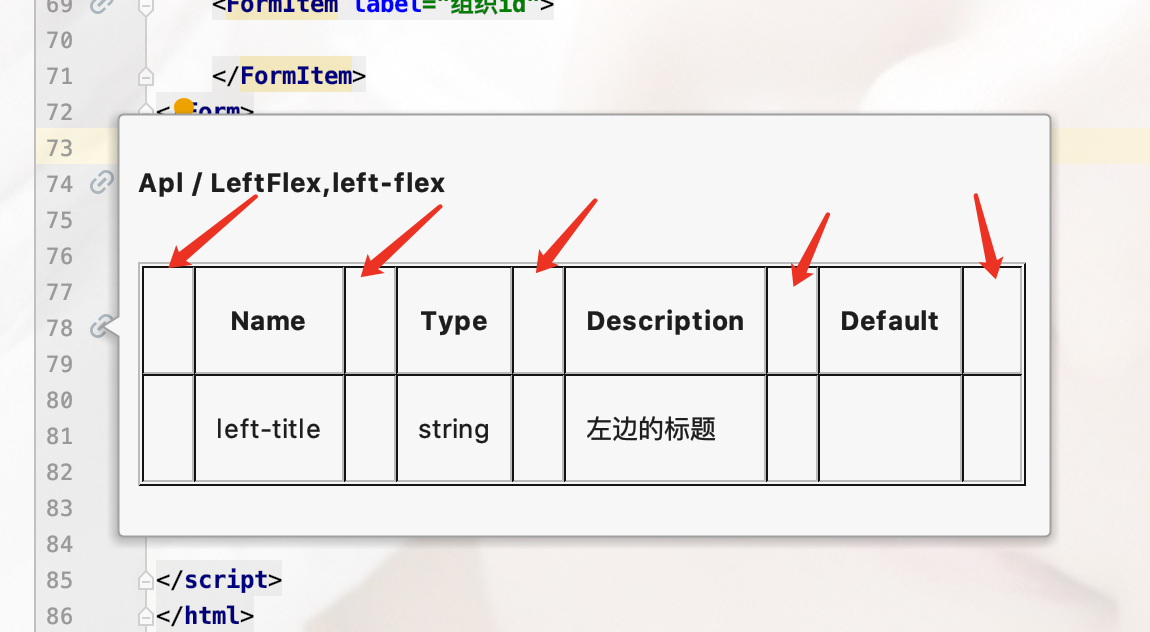
So I want to display an information form for the attribute,
But found some problems:
NavigationGutterIconBuilder<PsiElement> builder = NavigationGutterIconBuilder
        .create(AllIcons.Nodes.Related)
        .setTargets(element)
        .setTooltipText(this.prepComponentInfoPanel(i));
result.add(builder.createLineMarkerInfo(leafPsiElement));
Html Tabel:
<table border="1">
    <tr>
        <th>Name</th>
        <th>Type</th>
        <th>Description</th>
        <th>Default</th>
    </tr>
    <tr>
        <td>left-title</td>
        <td>string</td>
        <td>左边的标题</td>
        <td></td>
    </tr>
</table>
Please sign in to leave a comment.
Or there are other better ways to display, hope to tell me, thank you very much!
Abnormal gap:
code:
To adjust HTML rendering, you can try with style attribute set to the specific HTML elements.
However, such documentation should be handled with the DocumentationProvider implementation.
https://www.jetbrains.org/intellij/sdk/docs/reference_guide/custom_language_support/documentation.html?search=doc
class Barr extends AbstractDocumentationProvider {
    @Nullable
    @Override
    public PsiElement getCustomDocumentationElement(@NotNull Editor editor, @NotNull PsiFile file, @Nullable PsiElement contextElement) {
        return contextElement instance of ...;
    }

    @Nullable
    @Override
    public String generateDoc(PsiElement element, @Nullable PsiElement originalElement) {
        return "<table>...</table>";
    }
}
@Jakub Chrzanowski
Thanks for your answer, because I am not a custom language, but it conflicts with the original document, so I still stick to LineMarker # TooltipText
Fortunately, you gave me some tips, and now the function has been implemented