Mocha + Typescript - debugger stopped on incorrect line in tests

We have a web project with the mix of JS and TS.
We use Webpack to bundle code.
To run tests we use mocha.
Here is our tsconfig.json:
{
  "compilerOptions": {
    "allowJs": true,
    "allowSyntheticDefaultImports": true,
    "checkJs": false,
    "diagnostics": false,
    "downlevelIteration": true,
    "esModuleInterop": true,
    "incremental": true,
    "importHelpers": true,
    "jsx": "react",
    "lib": ["dom", "es2017"],
    "module": "commonjs",
    "moduleResolution": "node",
    "noEmit": false,
    "noEmitHelpers": false,
    "noEmitOnError": false,
    "noErrorTruncation": true,
    "noImplicitAny": false,
    "noImplicitThis": false,
    "noImplicitUseStrict": false,
    "noUnusedLocals": true,
    "noUnusedParameters": true,
    "outDir": "dist",
    "preserveConstEnums": true,
    "removeComments": false,
    "resolveJsonModule": true,
    "rootDir": ".",
    "skipDefaultLibCheck": true,
    "skipLibCheck": true,
    "sourceMap": true,
    "strict": true,
    "target": "es5",
    "baseUrl": ".",
    "paths": {
      "@app/*": ["app/*"]
    }
  },
  "include": [
    "app/types/**/*",
    "app/index.js",
    "app/entries/**/*",
    "app/lib/experiments/**/*",
    "storybook/**/*",
    "tests/**/*"
  ],
  "exclude": ["code-generators", "dist"]
}
Debugger from PyCharm for Mocha for JS files works fine, debugger stops at correct breakpoint line and you can go from line to line without any issue.
But when I execute debugger for tests written in TS, debugger stops at incorrect line.
Seems like incorrect mapping between source code and source map.
Here is what I have in the debugger configuration:
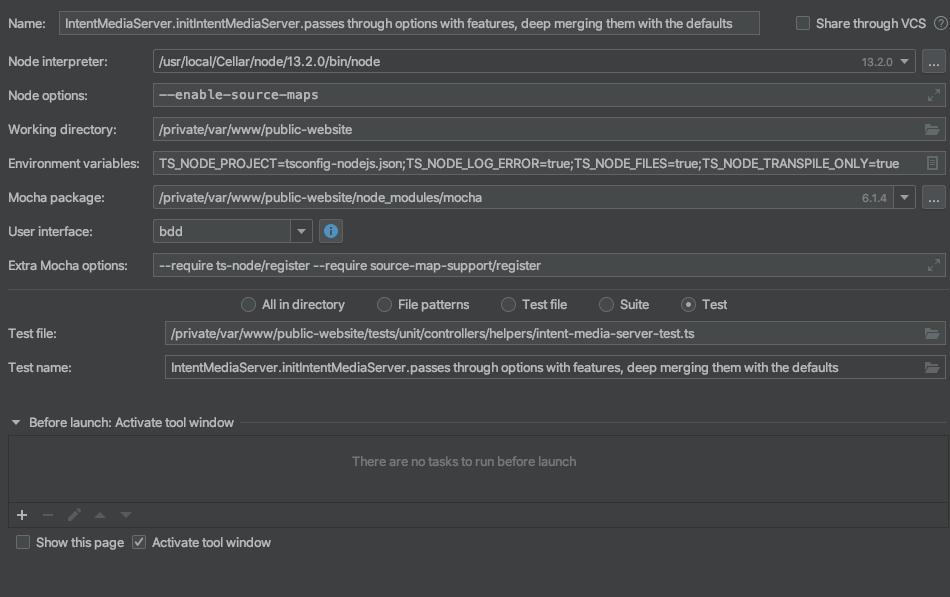
Here is the example of the issue:
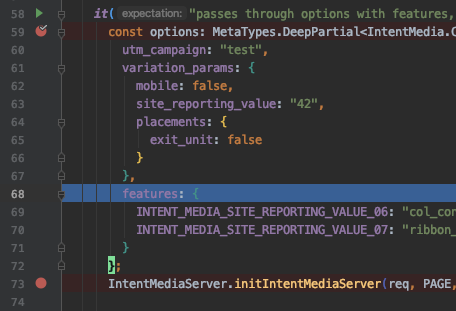
Instead of stopping at line 59, debugger stopped at line 68.
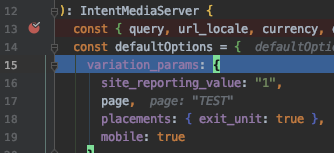
Instead of line 13, it stopped at line 15.
Could you please help to figure out how to fix the issue?
Thank you in advance for your help.
Please sign in to leave a comment.
Please could you share a sample project/spec file the issue can be reproduced with?