yellow bar appeared which I can't remove
Answered


Does anyone know what this yellow bar is? It has the project name shown within it and how do I remove it?
Please sign in to leave a comment.
Well at least yours is yellow - look at mine:
When I disable Material Theme UI it goes away. Material had an update this morning - so maybe related?
I tried to reinstall Material Theme UI, and swept through options and settings to not avail.
I kind of really like working with this theme package, but I can't look at my bar like that all day long, so will find alternative until it is fixed.
Anyone else having this issues or pointers as to how to remove it?
It didn't even dawn on my that it could have been the theme but makes total sense as Material Theme did update this morning.
They just updated again to 5.2.1, 15 min ago, the update changed the color of the bar but I still don't find the hability to remove it.
After the update, it disappeared for me. I'm using IntelliJ 2020.1 and MTUI 5.2.2
Oh great, I confirm it work with 5.2.2 for me too - this was a fast fix.
Cheers.
Unfortunately, the problem still appears on the version 5.3.4... so frustrating!
facing same problem on IntelliJ 2020.2 and MTUI 5.3.4. Don't know how to disable this bar.
Just pitching-in, the bar did not re-appeared in my instance since I reported it gone for 2020.1 and MTUI 5.2.2.
But I would rather not deactivate and reactivate MTUI just to try it.
Joining in to say that this is still happening with IntelliJ 2020.3 and MTUI 5.6.0.1. I really like having the MTUI themes though, so I won't be disabling it. Just leaving the comment so other people can find this thread if they face the same issue.
Unchecking the "Project Frame Colors" configuration fixed this for me
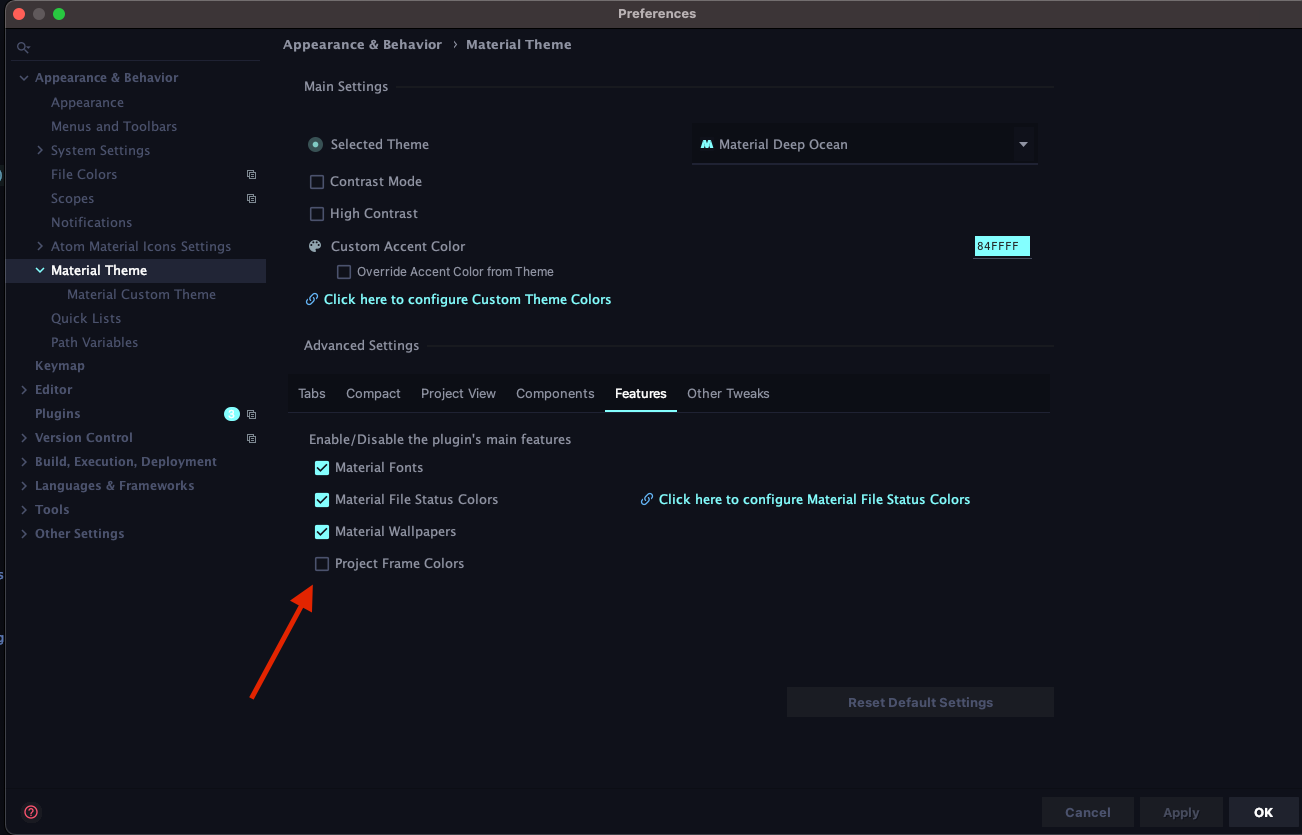
THANK YOU this was driving me mad