PHPStorm 2020.1 cannot find class

Since updating to PHPStorm 2020.1 (Mac OS), Storm can no longer find any classes or packages through namespaces.
As an example, here is one of my models (Laravel). As you can see most of the classes cannot be found, whether they are in the application itself, composer vendor files or (as with mongo) within a PHP extension.

This code all runs correctly, composer installs correctly. I can still run unit tests through PHPStorm using docker, the results of these tests are even still capable of linking to the correct test function in the code.
It's just within Storm this doesn't seem to work on all . I have:
- Composer dump Autoload
- Invalidated cache and restarted
- Deleted the project and set it up from scratch
- Trawled through loads of settings around php interpreters to ensure they're set up correctly.
- Disabled and reenabled "synchronise with composer.json"
- Laptop restarts, reinstalling Storm, etc...
Other developers in my team oddly do not have this issue at all.
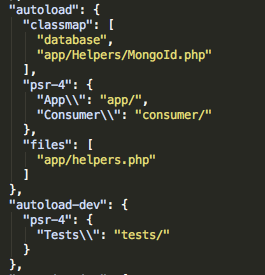
My composer autoload for reference. Which is being translated correctly into Preferences > Directories
Is there a setting I can check to try fix this? Any suggestions of a setting I may have missed would be appreciated
Thanks
Please sign in to leave a comment.
As a note I have now had to rolled back to 2019.3, which is working for me.
Hi there,
Please disable ALL custom (3rd party / not bundled by default) plugins and restart IDE -- any difference?
In one of the tickets it was caused by I-Pascal plugin (or some name similar to that).
Hi Andriy
I-Pascal was exactly it!
I did look through raised tickets earlier but couldn't find any.
Anyway thank you, that's been driving me mad most the day!
In my case, plugins disabling did not help.
But the following helped me: