Ultimate 2020.1 / Inspection issues
Answered

Hi,
I updated to Ultimate 2020.1 on two different computers and, working on PHP projects (haven't tried anything else yet), I noticed the inspection is not working properly.
For example here, where it says $node is not used anywhere, but it clearly is:

And I type I get weird warnings. Eg. expecting a semi-colon when there is one:
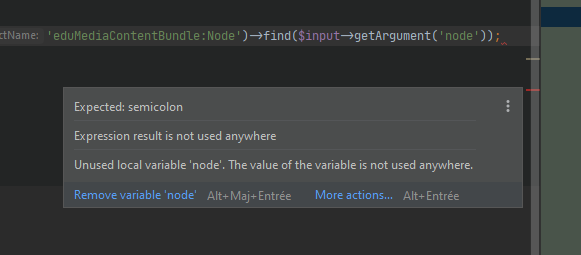
Probably linked: I can't use Refactor > Rename; it just doesn't do anything :(
Can you help me with that?
Please sign in to leave a comment.
Hello,
Please try to run "File | Invalidate Caches". If it doesn't help please share idea.log ("Help | Show Log in...") after restarting IDE and reproducing the issue.
I already tried to "Invalidate and Restart", and just tried again, but it did not help.
Here's the log file: https://we.tl/t-rlUOerumBa
Please try to uninstall all custom plugins:
```
Loaded custom plugins: AceJump (3.5.9), Apache config (.htaccess) (201.6668.60), .ignore (3.2.3.201), WakaTime (11.0.1), CSV Plugin (2.9.3), Live Edit (201.6668.60), Pug (ex-Jade) (201.6668.153), Vue.js (201.6668.153), PHP (201.6668.153), .env files support (2020.1), Symfony2 - Clickable Views (0.1.4), Twig (201.6668.153), PHP Toolbox (5.1.1), PHP Annotations (6.3.0), Symfony Support (0.19.191), PHP Remote Interpreter (201.6668.113), PHP Docker (201.6668.60)
```
and then install PHP plugin only.
Is it reproducible with new sample project?
I just did, but that didn't help (same on a blank project).
Here's the latest idea.log: https://we.tl/t-VUa4WuV3kg
Two screenshots to illustrate my words:
Even stranger:
That's strange!
If possible, please download & install PhpStorm (you can select "Evaluate for free" if asked for license) and check if the problem occurs there also.
Just downloaded and installed PhpStorm: everything works fine there.
It seems to be this one: https://youtrack.jetbrains.com/issue/IDEA-232052#focus=streamItem-27-3949733.0-0
Please check if following the advice helps.
Yup! Fixed everything!
Thanks a bunch.