How do I implement code completion from strings without PSI?
Answered

I need to show autocomplete popup menu like this
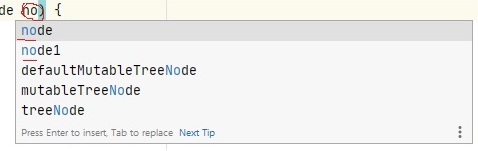
after the certain char pattern typed. I do not work with PSI and know what to show,
i.e. already have a list of strings for autocomplete menu for example A, B, C.
I tried to add the following
resultSet.addElement(LookupElementBuilder.create("A"));
resultSet.addElement(LookupElementBuilder.create("B"));
resultSet.addElement(LookupElementBuilder.create("C"));
into addCompletions fucntion of your sample class SimpleCompletionContributor, but no popup menu was shown, although the code was executed.
Also did the same thing as in MavenPropertyCompletionContributor overriding fillCompletionVariants and setting the same list there also gave me no popup shown, although the code was executed.
Of course one can extend TypedHandlerDelegate and show there smth like:
JBPopupFactory.getInstance().createListPopup(new BaseListPopupStep<String>
But it won't generate the panel like in the screenshot.
Could anyone give a hint how it can be easily implemented without all that PSI stuff involved?
Please sign in to leave a comment.
Viacheslav,
In the Completion Contributor section in the IntelliJ SDK Docs, there is a demo completion contributor described, which implements such feature for the Simple example language.
I assume that you're trying to do the same but for the existing language, right? You'll need to alter the extend method's second argument, which is a place - context for your completion - to match your requirements. You can use the PsiViewer plugin to track the correct PSI elements.
Hi Jakub,
Viacheslav,
Sorry for the late reply. Can I ask you to provide some repository with an example so I'll be able to debug it locally?
I prepared a simple IntelliJ Platform Plugin project here
Completion provided by your example works out of the box in the second scenario when I start typing H letter:
Just to sort it out - you expect to provide Hello/Hello2/Hello3 values as a value of the property abc, like:
{ "abc": "Hello" }or to suggest the key
{ "abcHello": ... }?
Yes, indeed, with typed char H it works! But what about the first case?
Expectation is that after "abc": is typed there is a popup shown with Hello* items to choose from (some items may not start with the same letter in general case).
Can it be implemented then?
Try with setting the following pattern as a second parameter for the extend method:
Yes, it works as expected, thank you very much for assistance.
This is something that you may control inside of the addCompletions method. Test the elements that you're adding to the resultSet against the resultSet.getPrefixMatcher(), like:
List<String> elements = ContainerUtil.immutableList("Hello", "Hello2", "Hello3");


String prefix = resultSet.getPrefixMatcher().getPrefix().toLowerCase();
for (String element : elements) {
    if (element.toLowerCase().startsWith(prefix)) {
        resultSet.addElement(LookupElementBuilder.create(element));
    }
}
I found GroovyReferenceCharFilter example with acceptChar method.
Hope it is the solution.