Trim whitespace in injected language (css)

Hi,
I guess I could have also asked this in another forum than RubyMine, but that's the app I'm using.
Trimming trailing whitespaces works perfectly elsewhere in my javascript file, except for within my injected css. The gif below shows what I mean. This is really annoying as I know vscode manages to do this just fine, and I'm not sure why it works there but not in RubyMine.
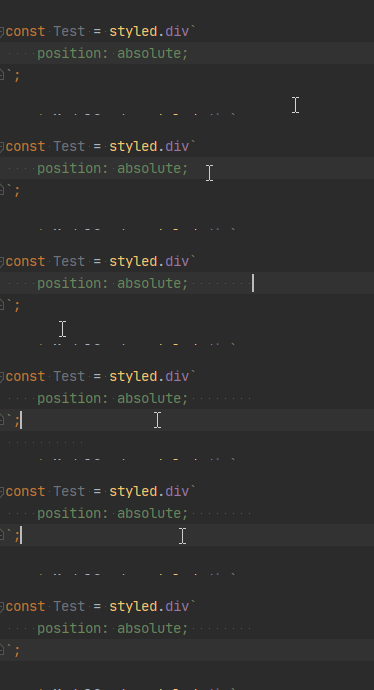
Is there any way I can have it trim within the "css" code as well?
Please sign in to leave a comment.
Works fine for me
You do not have CSS injected in your template, as far as I can see. Do you have Styled Components & Styled JSX (https://plugins.jetbrains.com/plugin/9997-styled-components--styled-jsx) plugin installed? Also, what IDE version do you use? also, by chance, do you have
.editorconfigfile anywhere in your project?I am using `RubyMine 2020.1.2 Build #RM-201.7846.78`
Searching for a file called `editorconfig` comes up with nothing, I also have the setting `Enable EditorConfig support` disabled for both `Default IDE` and `Project` schemas.
I do indeed have Styled Components & Styled JSX installed (as pictured below). If it was the colour of the CSS that threw you off I just set it back to be green as prefer being able to immediately differentiate between what is javascript and what is CSS.
I'm hopeful that there is a solution to this seeing as you're saying it is working for you, though I spent pretty much all of Sunday searching for the answer on Google before giving up and coming here. :/
As i wrote, it works fine for me with similar settings. Can you repeat the issue in a new project? Also, what do your settings for white spaces stripping look like (Settings | Editor | General, Save Files)?