Shortcut overshadowing
Answered

Hello, I use Linux and I have mapped "Left", "Up", "Right" and "Down" to AltGr + J, K, L, M respectively to have an easy access to these functions when coding. The functions work in every application but IntelliJ. I know that it is probably overshadowed by some other shortcut in IntelliJ but the issue is that I can't find it. Does AltGr have some special treatment in Intellij? Thank you
Please sign in to leave a comment.
Hello Jan,
What keyboard layout do you use? Please try to click on "Find action by shortcut" in "Settings | Keymap" and check what key combination will be detected if you press "AltGr+J/K/L/M".
Hello,
it says nothing to show when I press the key combination. I use my own keyboard layout (the one I named "custom") based on US layout. I did the modifications because I want to keep my fingers on the main row as much as possible. The layout works fine out of IntelliJ. Is it possible that AltGR has some special treatment in IntelliJ?
Thank you
Jan,
Please share idea.log ("Help | Show Log in...") after restarting IDE.
Hello,
here is the log.
Thank you for your help,
Jan
Jan,
Could you please try to run 2020.2 EAP version (https://www.jetbrains.com/idea/nextversion/#section=linux) with defaults ("File | Manage IDE settings | Restore default settings") and check if and keypresses with "AltGr" are detected in "Settings | Keymap"?
I tried the EAP version with defaults and assigned new shortcut with AltGR to "Move Caret to Line End" and it works fine. It seems that defining the shortcuts in IntelliJ directly is robust but having them system wide in xkb/symbols/keyboard_layout is not. However if it's too unsolvable I think I will do fine with just having the END of line accessible with shortcut close to my fingers which can be defined within the IDE. Thank you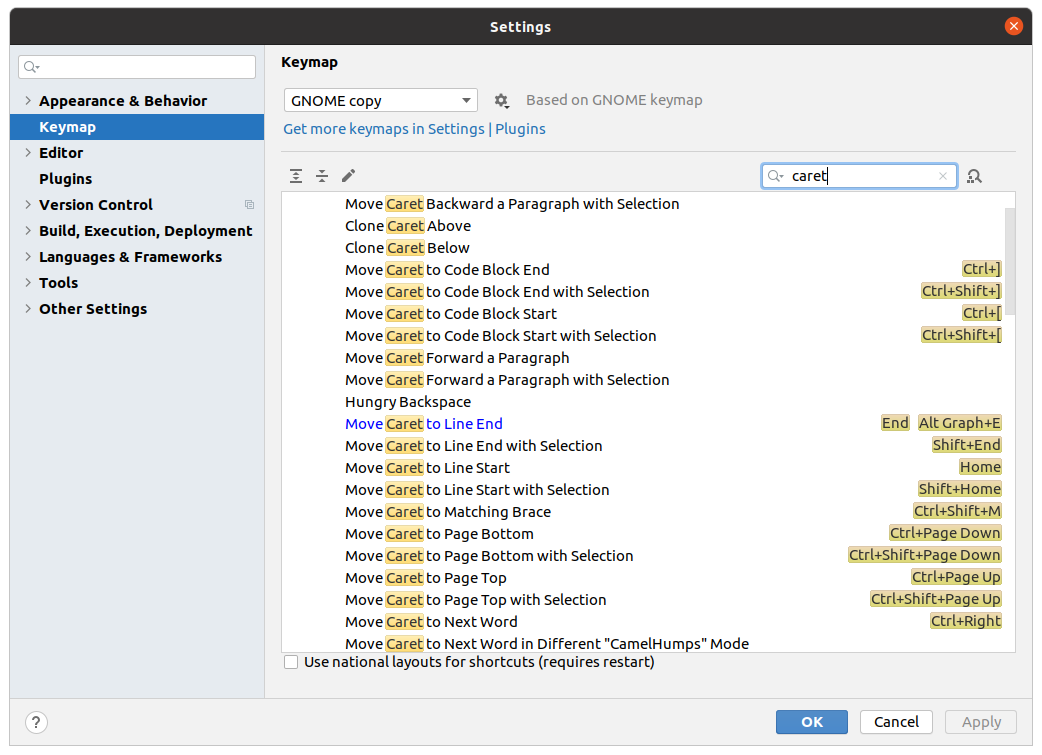
Jan,
Thanks for the information! There is related request on YouTrack: https://youtrack.jetbrains.com/issue/IDEA-219690. Please vote and follow for updates.