[feat] Assign names to WSL Project Interpreters

Hi,
On Windows, I usually keep my Python code on the WSL disk, not the Windows mount, because it's faster that way with WSL 2. When using Poetry, the Poetry environments also lives inside the WSL machine.
These are not autodetected by PyCharm, so I add them manually as WSL Python Interpreters. But there is no way to name them, so they get names like "3.8 @ Ubuntu" (first project), "3.8 @ Ubuntu (2)" (second project) and so on.
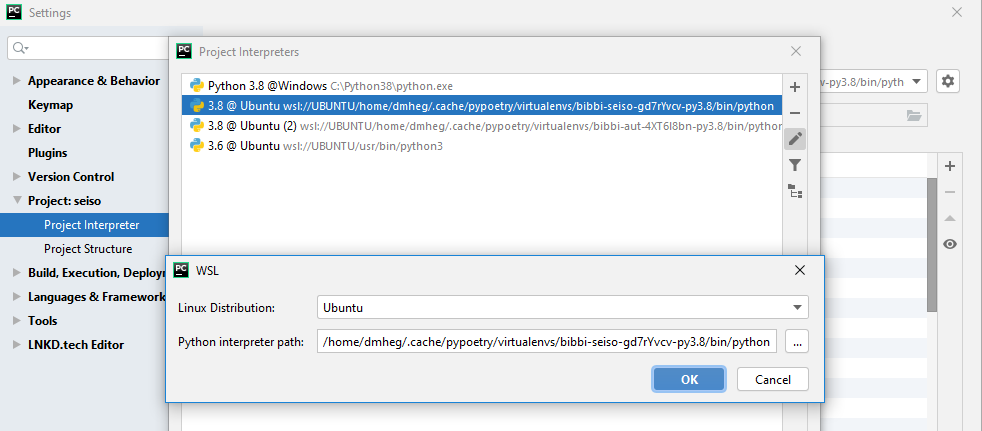
I usually don't remember which belongs to which project, so I have to open the Python Interpreters window to check if I did set the right one. For other types of Project Interpreters, it's possible to assign a custom name. Would be very helpful if that could also be supported for WSL interpreters.
Of course, I would also love to see full-blown Poetry integration, but just being able to rename my WSL interpreters would already make my life a bit easier.
Please sign in to leave a comment.
Hi,
It's a known problem: https://youtrack.jetbrains.com/issue/PY-43763
Sorry for the inconvenience. It requires some Python SDK re-implementation, the developers are already working on it.
We've been struggling with this too, for a long time now - Andrey Resler , is there any update on the ability to rename a WSL interpreter? I'm now on 2021.2.1, and I still can't rename interpreters.
Not yes, unfortunately. Please vote for https://youtrack.jetbrains.com/issue/PY-43763
Approximately, will be fixed in 2021.3 release in November.
I'm now on 2021.3, and I still can't rename the interpreter. The youtrack item above no longer exists.
Andrey Resler Is that still in the making or has this ask been parked?
Antonsc
Yes, the underlying changes of the code running mechanism have been moved to 2022.1, it seems.
I'm sorry for the inconvenience.