IntelliJ IDEA won't open because of heap
Answered

Hello Im running MacOS Catalina 10.15.6 and my intelliJ is up to date. I try changing the max of the heap because it was running out and now it won't open. Anything would help!
Please sign in to leave a comment.
Try removing IDE's .vmoptions file (https://www.jetbrains.com/help/idea/tuning-the-ide.html#configure-jvm-options)
If it does not help, share the error on attempt to start IDE from the command line: https://intellij-support.jetbrains.com/hc/en-us/articles/360011901879-How-to-start-IDE-from-the-command-line
Hello sorry for the late reply. I remove the idea.vmoptions and nothing happened. I also try to open it through the terminal and nothing.
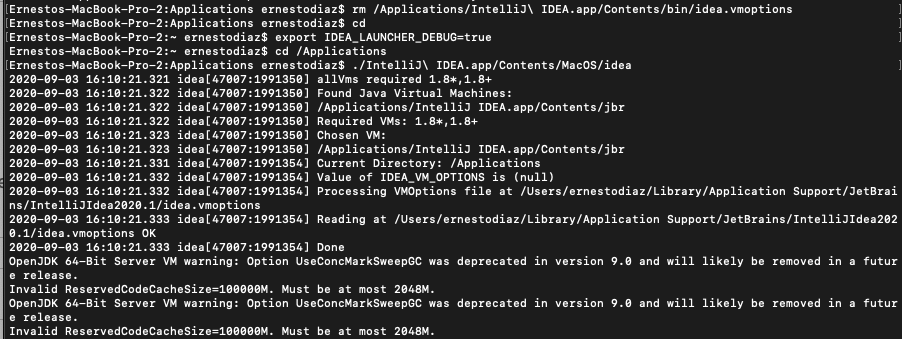
There is invalid option in VM options, see the error:
Invalid ReservedCodeCacheSize=10000M. Must be at most 2048M.
So, please remove this option from /Users/ernestodiaz/Library/Application Support/JetBrains/IntelliJIDEA2020.1/idea.vmoptions
I did remove that file and it still won't open
Please show the terminal's output when starting IntelliJ IDEA (the same as in the previous message).
here it is. I used this two
The error is the same.
Could you open /Users/ernestodiaz/Library/Application Support/JetBrains/IntelliJIDEA2020.1/idea.vmoptions and check if "ReservedCodeCacheSize" is set here?