Problem with US-keyboard layout

Hello, JetBrains support team.
I'm just start using JetBrains PhpStorm on Mac OS through Citrix Workspace in remote PC and faced with keyboard problem.
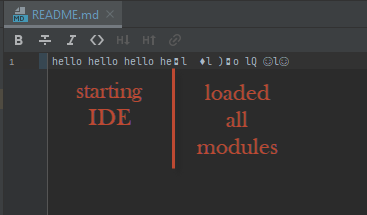
When I type on US-keyboard, I see wrong symbols except letters.
Interesting fact, that I saw. Layout is correct immediately after IDE loaded, problem comes after 5-10 seconds, when loading of all modules are complete.
I understand, that my using IDE through remote access is not correct case for support, but maybe I can disable one of IDE feature, that could be related for this bug.
US layout fully correct in all other apps. It is correct even in terminal window in PhpStorm. Problem only occurs in editor and in commit message textarea. The same problems in WebStorm.
I have tried to add -Dfile.encoding=UTF-8 in config, and change fonts, that is not works for me.
Please sign in to leave a comment.
Would it help if you switch to "ABC" layout instead of "US"?
Do you have IDE install on Linux or Windows on a remote site?
Yes, I have tried to switch almost all US-keyboard: ABC, Canadian, US, US-PC and many more :)
When I use PhpStorm on remote from Windows, there are no problems. Just when I start using Macbook.
Maybe my description is not completely correct. Remote PC works only in Windows 10 OS (company requirements).
Connect from Windows by Citrix to the remote PC (based on Windows 10) -> works perfect
Connect from Mac OS Catalina by Citrix to the remote PC (based on Windows 10) -> problem
Do you have any other Java applications installed on a remote site? It would be great if you could check if the behavior is the same there.
It would be also great to have a look at the IDE logs. If possible please share them (Help > Show log in ...) or send them over to us via Help | Contact Support.
What applications it could be?
What about logs, yes, I can share logs a little bit later
Logs sent to the Help -> Contact support
Thanks, we'll check them. As for the app - probably Netbeans?
No, there is no much applications in remote PC, and install them only available by system administrator :)
I have VSCode installed, but it is not on Java.
It seems to be a Citrix issue. Try next steps:
1. Close Citrix application
2. Open ~/Library/Application Support/Citrix Receiver/Config
3. Change KeyboardLayout=(User Profiler) into KeyboardLayout=US-International and save changes.
Source: https://www.wizza.nl/2017/01/16/fix-osx-citrix-receiver-keyboard-showing-incorrect-characters/
@... Thanks for the tip, that's help me.