How to activate autocomplete and color code when using sqlite3 package in Python
Answered

Hi everyone,
I am coding Python in IntelliJ IDE and using sqlite3 package. Unfortunately IntelliJ doesn't color code sqlite3 commands. They are all looks text.
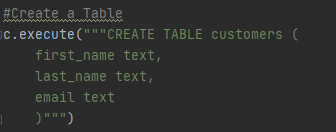
I am expecting all the individual words in the c.execute function to be color coded. It also doesn't autocomplete.
Any idea how I can solve this issue?
Please sign in to leave a comment.
Hi Iman,
Try single quotes instead of double quotes:
c.execute('''CREATE TABLE stocks(date text, trans text, symbol text, qty real, price real)''')
Hi Arina,
Thank you very much for helping me on this.
It doesn't look like as yours even with the single quotes. Do you think I should install any special package or something?
Iman, make sure the following bundled plugin is enabled under File | Settings | Plugins > Installed:
If you don't see it, then you must have a Community Edition of IntelliJ IDEA. SQL support is bundled in the Ultimate version only.