React script test raise unxpected token error

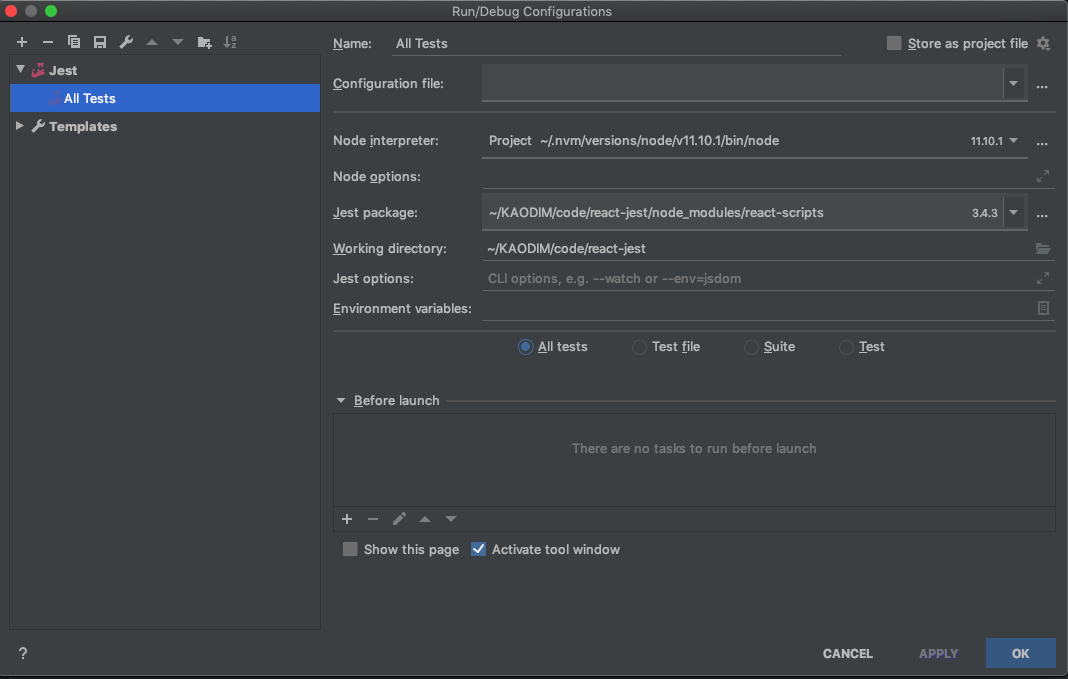
I was trying to run a react unit test via Jest. The react app was created using react-react-app. I use ~/KAODIM/code/react-burger-builder/node_modules/react-scripts as the Jest package (see embedded image for my IDE Jest config)
When I run the test, I got the following error.
/Users/Daniel/.nvm/versions/node/v11.10.1/bin/node --require "/Users/Daniel/Library/Application Support/JetBrains/Toolbox/apps/WebStorm/ch-0/201.8538.32/WebStorm.app/Contents/plugins/JavaScriptLanguage/helpers/jest-intellij/lib/jest-intellij-stdin-fix.js" /Users/Daniel/KAODIM/code/react-burger-builder/node_modules/react-scripts/bin/react-scripts.js test --env=jsdom --colors --reporters "/Users/Daniel/Library/Application Support/JetBrains/Toolbox/apps/WebStorm/ch-0/201.8538.32/WebStorm.app/Contents/plugins/JavaScriptLanguage/helpers/jest-intellij/lib/jest-intellij-reporter.js" --verbose --runTestsByPath /Users/Daniel/KAODIM/code/react-burger-builder/src/components/Navigation/NavigationItems/NavigationItems.test.js
/Users/Daniel/KAODIM/code/react-burger-builder/node_modules/react-scripts/scripts/utils/createJestConfig.js:59
...(modules.jestAliases || {}),
^^^
SyntaxError: Unexpected token ...
at createScript (vm.js:74:10)
at Object.runInThisContext (vm.js:116:10)
at Module._compile (module.js:533:28)
at Object.Module._extensions..js (module.js:580:10)
at Module.load (module.js:503:32)
at tryModuleLoad (module.js:466:12)
at Function.Module._load (module.js:458:3)
at Module.require (module.js:513:17)
at require (internal/module.js:11:18)
at Object.<anonymous> (/Users/Daniel/KAODIM/code/react-burger-builder/node_modules/react-scripts/scripts/test.js:70:26)
Process finished with exit code 1
However, if I invoke the same command in my terminal under the project directory, the test run as expected without any issue.
Am I missing any configuration here?
My environment detail:
Webstore 2020.1.3
Node v11.10.1 (through nvm)
macOS v10.14.6
package.json as follow
{
  "name": "react-burger-builder",
  "version": "0.1.0",
  "private": true,
  "dependencies": {
    "@babel/plugin-transform-react-jsx": "^7.10.4",
    "@babel/plugin-transform-react-jsx-self": "^7.10.4",
    "@testing-library/jest-dom": "^4.2.4",
    "@testing-library/react": "^9.3.2",
    "@testing-library/user-event": "^7.1.2",
    "axios": "^0.19.2",
    "enzyme": "^3.11.0",
    "enzyme-adapter-react-16": "^1.15.4",
    "immutability-helper": "^3.1.1",
    "prop-types": "^15.7.2",
    "react": "^16.13.1",
    "react-dom": "^16.13.1",
    "react-redux": "^7.2.1",
    "react-router-dom": "^5.2.0",
    "react-scripts": "3.4.1",
    "react-test-renderer": "^16.13.1",
    "redux": "^4.0.5",
    "redux-thunk": "^2.3.0"
  },
  "scripts": {
    "start": "react-scripts start",
    "build": "react-scripts build",
    "test": "react-scripts test",
    "eject": "react-scripts eject"
  },
  "eslintConfig": {
    "extends": "react-app"
  },
  "browserslist": {
    "production": [
      ">0.2%",
      "not dead",
      "not op_mini all"
    ],
    "development": [
      "last 1 chrome version",
      "last 1 firefox version",
      "last 1 safari version"
    ]
  }
}

Please sign in to leave a comment.
Also, if I run npm test using the IDE task tool, it works.
/Users/Daniel/.nvm/versions/node/v11.10.1/bin/node /Users/Daniel/.nvm/versions/node/v11.10.1/lib/node_modules/npm/bin/npm-cli.js test --scripts-prepend-node-path=auto
> react-burger-builder@0.1.0 test /Users/Daniel/KAODIM/code/react-burger-builder
> react-scripts test
PASS src/components/Navigation/NavigationItems/NavigationItems.test.js
<NavigationItems />
✓ should render 2 <NavigationItem /> elements if not authenticated (25ms)
Test Suites: 1 passed, 1 total
Tests: 1 passed, 1 total
Snapshots: 0 total
Time: 3.382s
Ran all test suites related to changed files.
Watch Usage
› Press a to run all tests.
› Press f to run only failed tests.
› Press q to quit watch mode.
› Press p to filter by a filename regex pattern.
› Press t to filter by a test name regex pattern.
› Press Enter to trigger a test run.
Process finished with exit code 0
I tried to add a debug line before the original syntax occurred and I spotted the following difference. Not sure if we can find something useful to debug this issue.
When run test via IDE,
/Users/Daniel/.nvm/versions/node/v11.10.1/bin/node --require "/Users/Daniel/Library/Application Support/JetBrains/Toolbox/apps/WebStorm/ch-0/201.8538.32/WebStorm.app/Contents/plugins/JavaScriptLanguage/helpers/jest-intellij/lib/jest-intellij-stdin-fix.js" /Users/Daniel/KAODIM/code/react-burger-builder/node_modules/react-scripts/bin/react-scripts.js test --env=jsdom --colors --reporters "/Users/Daniel/Library/Application Support/JetBrains/Toolbox/apps/WebStorm/ch-0/201.8538.32/WebStorm.app/Contents/plugins/JavaScriptLanguage/helpers/jest-intellij/lib/jest-intellij-reporter.js" --verbose --runTestsByPath /Users/Daniel/KAODIM/code/react-burger-builder/src/components/Navigation/NavigationItems/NavigationItems.test.js
Error: debug
at Object.<anonymous> (/Users/Daniel/KAODIM/code/react-burger-builder/node_modules/react-scripts/scripts/test.js:70:7)
at Module._compile (module.js:569:30)
at Object.Module._extensions..js (module.js:580:10)
at Module.load (module.js:503:32)
at tryModuleLoad (module.js:466:12)
at Function.Module._load (module.js:458:3)
at Function.Module.runMain (module.js:605:10)
at startup (bootstrap_node.js:158:16)
at bootstrap_node.js:575:3
Process finished with exit code 1
When run in terminal
/Users/Daniel/.nvm/versions/node/v11.10.1/bin/node --require "/Users/Daniel/Library/Application Support/JetBrains/Toolbox/apps/WebStorm/ch-0/201.8538.32/WebStorm.app/Contents/plugins/JavaScriptLanguage/helpers/jest-intellij/lib/jest-intellij-stdin-fix.js" /Users/Daniel/KAODIM/code/react-burger-builder/node_modules/react-scripts/bin/react-scripts.js test --colors --verbose "--testNamePattern=^<NavigationItems /> " --runTestsByPath /Users/Daniel/KAODIM/code/react-burger-builder/src/components/Navigation/NavigationItems/NavigationItems.test.js
Error: debug
at Object.<anonymous> (/Users/Daniel/KAODIM/code/react-burger-builder/node_modules/react-scripts/scripts/test.js:70:7)
at Module._compile (internal/modules/cjs/loader.js:738:30)
at Object.Module._extensions..js (internal/modules/cjs/loader.js:749:10)
at Module.load (internal/modules/cjs/loader.js:630:32)
at tryModuleLoad (internal/modules/cjs/loader.js:570:12)
at Function.Module._load (internal/modules/cjs/loader.js:562:3)
at Function.Module.runMain (internal/modules/cjs/loader.js:801:12)
at internal/main/run_main_module.js:21:11
does the issue persist if you run tests with All Tests scope (i.e. not the individual test)?
Sample project the issue can be repeated with would be helpful
I still get the same error when running with All Tests configured.
/Users/Daniel/.nvm/versions/node/v11.10.1/bin/node --require "/Users/Daniel/Library/Application Support/JetBrains/Toolbox/apps/WebStorm/ch-0/201.8538.32/WebStorm.app/Contents/plugins/JavaScriptLanguage/helpers/jest-intellij/lib/jest-intellij-stdin-fix.js" /Users/Daniel/KAODIM/code/react-burger-builder/node_modules/react-scripts/bin/react-scripts.js test --env=jsdom --colors --reporters "/Users/Daniel/Library/Application Support/JetBrains/Toolbox/apps/WebStorm/ch-0/201.8538.32/WebStorm.app/Contents/plugins/JavaScriptLanguage/helpers/jest-intellij/lib/jest-intellij-reporter.js" --verbose
/Users/Daniel/KAODIM/code/react-burger-builder/node_modules/react-scripts/scripts/utils/createJestConfig.js:60
...(modules.jestAliases || {}),
^^^
SyntaxError: Unexpected token ...
at createScript (vm.js:74:10)
at Object.runInThisContext (vm.js:116:10)
at Module._compile (module.js:533:28)
at Object.Module._extensions..js (module.js:580:10)
at Module.load (module.js:503:32)
at tryModuleLoad (module.js:466:12)
at Function.Module._load (module.js:458:3)
at Module.require (module.js:513:17)
at require (internal/module.js:11:18)
at Object.<anonymous> (/Users/Daniel/KAODIM/code/react-burger-builder/node_modules/react-scripts/scripts/test.js:70:26)
Process finished with exit code 1
"Sample project the issue can be repeated with would be helpful", what do you mean here??
>what do you mean here?
A project I can use to reproduce the issue
Here you go https://github.com/khun84/react-jest , please check out to branch debug-rubymine as I'll freeze the code in this branch for debug purpose.
Below is the reproduced error.
/Users/Daniel/.nvm/versions/node/v11.10.1/bin/node --require "/Users/Daniel/Library/Application Support/JetBrains/Toolbox/apps/WebStorm/ch-0/201.8538.32/WebStorm.app/Contents/plugins/JavaScriptLanguage/helpers/jest-intellij/lib/jest-intellij-stdin-fix.js" /Users/Daniel/KAODIM/code/react-jest/node_modules/react-scripts/bin/react-scripts.js test --colors --reporters "/Users/Daniel/Library/Application Support/JetBrains/Toolbox/apps/WebStorm/ch-0/201.8538.32/WebStorm.app/Contents/plugins/JavaScriptLanguage/helpers/jest-intellij/lib/jest-intellij-reporter.js" --verbose
/Users/Daniel/KAODIM/code/react-jest/node_modules/react-scripts/scripts/utils/createJestConfig.js:59
...(modules.jestAliases || {}),
^^^
SyntaxError: Unexpected token ...
at createScript (vm.js:74:10)
at Object.runInThisContext (vm.js:116:10)
at Module._compile (module.js:533:28)
at Object.Module._extensions..js (module.js:580:10)
at Module.load (module.js:503:32)
at tryModuleLoad (module.js:466:12)
at Function.Module._load (module.js:458:3)
at Module.require (module.js:513:17)
at require (internal/module.js:11:18)
at Object.<anonymous> (/Users/Daniel/KAODIM/code/react-jest/node_modules/react-scripts/scripts/test.js:70:26)
Process finished with exit code 1
Process finished with exit code 1
works fine for me with your project (using the same Node.js and IDE versions)
the error message looks like it doesn't understand the spread operator (see https://developer.mozilla.org/en-US/docs/Web/JavaScript/Reference/Operators/Spread_syntax) which would suggest Node < 8... Does the issue persist if you start the IDE from terminal?
So I launch the IDE as follow and I still get the same error when I run it. By the way, I have specified the desired node version in the config right?
Also Im using nvm to manage multiple nodejs version in my Mac.
Daniel@code[] ✔ cd react-jest/
Daniel@react-jest[debug-rubymine] ✔ webstorm .
Daniel@react-jest[debug-rubymine] ✔
weird... please try adding
to the very first line of /Users/Daniel/Library/Application Support/JetBrains/Toolbox/apps/WebStorm/ch-0/201.8538.32/WebStorm.app/Contents/plugins/JavaScriptLanguage/helpers/jest-intellij/lib/jest-intellij-stdin-fix.js - what version will be printed to console when running tests?
apologize for the late reply...I follow your instruction and it was v11.10.1
/Users/Daniel/.nvm/versions/node/v11.10.1/bin/node --require "/Users/Daniel/Library/Application Support/JetBrains/Toolbox/apps/WebStorm/ch-0/201.8538.32/WebStorm.app/Contents/plugins/JavaScriptLanguage/helpers/jest-intellij/lib/jest-intellij-stdin-fix.js" /Users/Daniel/KAODIM/code/react-jest/node_modules/react-scripts/bin/react-scripts.js test --colors --reporters "/Users/Daniel/Library/Application Support/JetBrains/Toolbox/apps/WebStorm/ch-0/201.8538.32/WebStorm.app/Contents/plugins/JavaScriptLanguage/helpers/jest-intellij/lib/jest-intellij-reporter.js" --verbose
logging version------------
v11.10.1
/Users/Daniel/KAODIM/code/react-jest/node_modules/react-scripts/scripts/utils/createJestConfig.js:59
...(modules.jestAliases || {}),
^^^
I also console log process.versions, can it be the issue with v8 engine?
{ node: '11.10.1',
v8: '7.0.276.38-node.17',
uv: '1.26.0',
zlib: '1.2.11',
brotli: '1.0.7',
ares: '1.15.0',
modules: '67',
nghttp2: '1.34.0',
napi: '4',
llhttp: '1.1.1',
http_parser: '2.8.0',
openssl: '1.1.1a',
cldr: '34.0',
icu: '63.1',
tz: '2018e',
unicode: '11.0' }
It seems its related to multiple node versions on my local.
Daniel@react-jest[debug-rubymine] ✔ nvm list
v8.0.0
-> v8.16.0
v11.10.1
system
default -> 8.0.0 (-> v8.0.0)
node -> stable (-> v11.10.1) (default)
stable -> 11.10 (-> v11.10.1) (default)
iojs -> N/A (default)
unstable -> N/A (default)
lts/* -> lts/erbium (-> N/A)
lts/argon -> v4.9.1 (-> N/A)
lts/boron -> v6.17.1 (-> N/A)
lts/carbon -> v8.17.0 (-> N/A)
lts/dubnium -> v10.20.0 (-> N/A)
lts/erbium -> v12.16.2 (-> N/A)
After I uninstall v8.0.0 from nvm, the test could run.
>It seems its related to multiple node versions on my local.
yes, that's likely the issue