Environments Variables setting

My Java application used a JNI library, and I have tried to add the path where the `*.dll` is located to `path` environment globally.
However when I run the app in IDEA,I got error:
Native library load failed.
java.lang.UnsatisfiedLinkError: D:\install\xxx\xx.dll: can not find the specified program
java.lang.UnsatisfiedLinkError: org.gdal.ogr.ogrJNI.RegisterAll()V
at org.gdal.ogr.ogrJNI.RegisterAll(Native Method)
at org.gdal.ogr.ogr.RegisterAll(ogr.java:131)
at org.geotools.data.ogr.FilterTest.<clinit>(FilterTest.java:21)
Exception in thread "main"
But I am SURE that the `D:\install\xxx\xx.dll` file exist.
Then I tried to set the environment variables again in IDEA (the name and value are exactly the same as the setting in global):

And if I check the variables, I found that they are not listed, but the same variables are highlighted with a blue color:
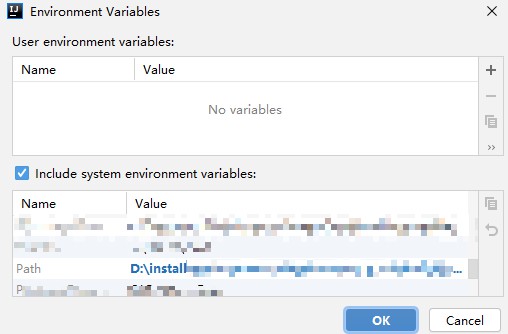
Then I ran the program again, it worked as expected.
What's going on?
BTW, I check the commands IDEA runs carefully, and they are exactly the same no matter what environment varietals are set.

So how does the variables take affect for the program?
Please sign in to leave a comment.
Have you restarted IntelliJ IDEA and JetBrains ToolBox after changing the path variable?
Yes, and I have tried to restart the whole system.
Please share the exact steps to reproduce and the logs folder compressed by creating a ticket at YouTrack.
Is it desired to not list the duplicated variables?