Color scheme bug

Hello,
I would like to report a weird coloring behavior that I had for a while. I tried to reset to default theme and used different color schemes but the issue is still occurring:
Consider this code snippet:
<?php

$foo = [
    'string' => true,
    'string2' => false,
    'string3' => true,
    'string4' => true,
    'string5' => true,
    'string6' => false,
    'string7' => false,
];
In the editor, it looks like this:

Now, add a TODO in the middle of the array:
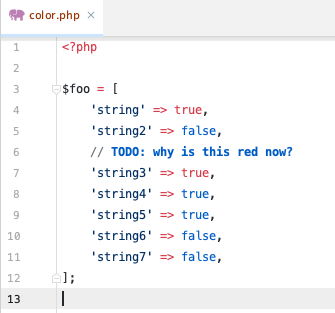
Let's move the comment down:
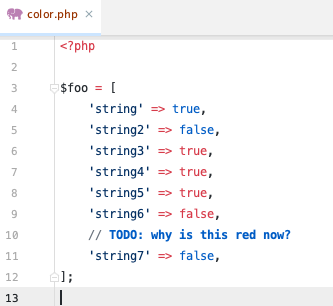
How could you explain this?
Thanks
Please sign in to leave a comment.
What color scheme do you have chosen at Settings | Editor | Color Scheme?
Hello,
For this example, it was a Github color scheme but I tried with some other schemes and the issue was still there. I don't think it's related to the color scheme but how phpStorm identifies the code tokens.
Thanks,
I can't reproduce that on the default color scheme, so it's either the color scheme or the custom theming plugin you are using: https://recordit.co/XAWCCl5y8w
Please check if the issue is still there on the default color scheme, and if it is, disable all custom plugins and restart (Settings | Plugins | Installed | [Gear icon] | Disable All Downloaded Plugins).
Hello,
I did further tests and the issue is coming from the Material UI Theme. I could not reproduce the issue when this plugin is not installed.
I see there's already an open issue so I'll add my input: https://github.com/ChrisRM/material-theme-jetbrains/issues/1603
Thanks and sorry for the disturbance.
No worries at all, thank you for sharing your findings.