VCS has changed with 2020.3
Answered

With the previous version of PyCharm (Community Edition) 2020.2.5, I had a VCS option on the menu that allowed me with a single option to show a comparison of the current version of the current file with any number of previous versions. I could choose which older version to compare to and it highlighted the differences. It didn't require any action on my part to make this happen.
How can I do the same with 2020.3? Has the upgrade caused me to lose all the old versions?
Thanks,
Julian
Please sign in to leave a comment.
You can do that with Git | Current file | Compare with revisions
You can also view diff for every commit on the Git tool window.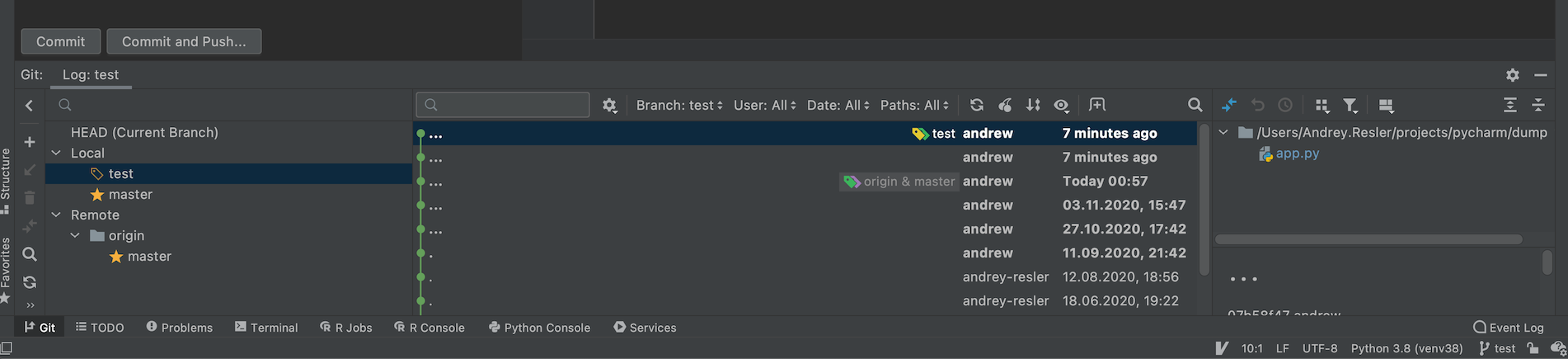
If this is not what you're looking for, please share some screenshots demonstrating the issue.
Thank you Andrey. Two questions.
1. Do I now have to commit every time I change a file? With the previous version of PyCharm it automatically kept track of all changes and let me compare any previous version with the current version (and, in fact, compare previous versions with other previous versions). Can I set it to reproduce that behaviour by, for example, committing automatically?
2. Have I now lost all the version history that was there before the upgrade?
Julian
Julian Gall
1. PyCharm still tracks all changes automatically, but if you want to "Save" them in history, then you need to commit. You are still able to compare any versions between each other. If needed - please choose few commits in Log, right-click and you can choose "Compare Versions". There is no option to commit automatically.
2. If you haven't deleted your .git repository then all your changes remain and IDE is able to show it to you.
Please let us know if there is any misunderstanding occured.