Order of user's custom variables inside file templates

Hi,
I recently updated from intelliJ 2018 to intelliJ 2020. The changes are awesome, and I'm loving Git integration - however, one major issue has come to light. For some reason, the order of custom variables I use inside my file templates appears to be set to a random order, unlike before, when the order of the fields was determined by their order of use inside the file. Before, I used a line to set the order of fields so that I could use keyboard and the tab button to easily fill out the fields of my template in the order that made the most sense:
// intellij stuff ${TYPE}, ${TARGET}, ${RARITY}, ${DAMAGE}, ${UPGRADE_DAMAGE}, ${BLOCK}, ${UPGRADE_BLOCK}, ${MAGIC}, ${UPGRADE_MAGIC}
Now, however, the fields come up in an order I don't understand, and that line doesn't appear to do anything. Does anyone know how IntelliJ now orders fields in template creation, and how I could order them the way I like?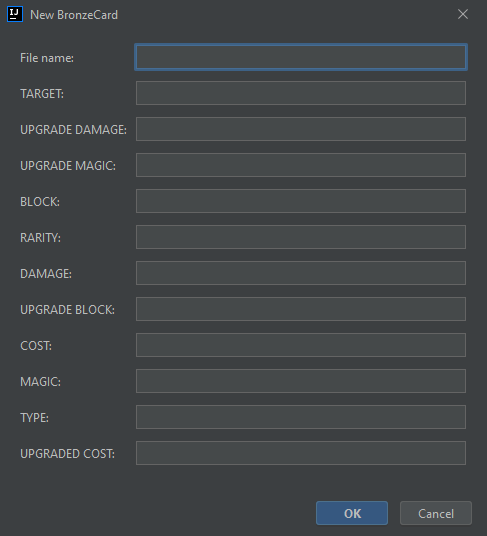
Please sign in to leave a comment.
After reviewing it more, it looks like this is caused by the fields going through a HashSet and erroneously being sorted by hash code in the process.
Please follow this issue on YouTrack: https://youtrack.jetbrains.com/issue/IDEA-259172