JavaFX 11 FXML dependencies
Answered

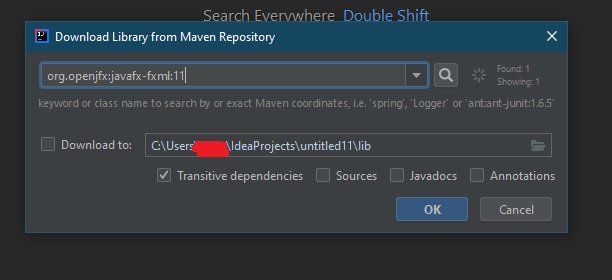
I have supposedly successfully set up JavaFX 11 on my computer but every time I create a new JavaFX 11 project in IDEA it prompts me with the "Download Repositories from Maven" window with "Transitive Dependencies" automatically checked. Isn't this something that is supposed to be included with JavaFX 11 already so why does it ask me to download it?
Please sign in to leave a comment.
JavaFX is no more than set of libraries (files) that should be linked to your project after creating. IDE is not aware if they are downloaded to the computer.
Did you link the JavaFX 11 libraries to your project before this dialog? https://www.jetbrains.com/help/idea/javafx.html#add-javafx-lib
If no, IntelliJ IDEA asks if it is needed to download them. You can ignore that and add libraries manually.
Ah, I thought you could make IDEA be aware of JavaFX's presence beforehand the same way as with the Java SDK itself. The Download Repositories from Maven dialogue appears instantly when I create a new JavaFX project, though, giving me no chance to manually link it myself. I have to click Cancel and then go into the Project Settings afterwards to do that. Is there a way to make a default template for JavaFX projects that would have it always already linked?