How to forbid removing tabs manually?
Answered

Hello
Sometimes when I write code I'd like to use tabulation for mpre convenient appearance. See this:


But if I use auto reformat (ctrl + A and then ctrl + alt + L) all my tabs are removed and code becomes hard to read. See this:
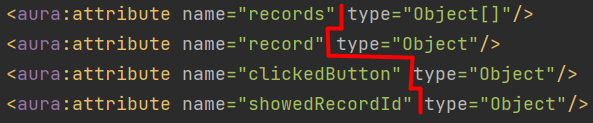

In most cases auto reformat is helpful, I don't want to turn it off or highlight not whole code.
I just wonder whether there is a way to manually lock some lines from auto reformat.
Please sign in to leave a comment.
There is no such a single global option to keep manual indents. There are separate indent options like Settings (Preferences on macOS) | Editor | Code Style | Java | Wrapping and Braces | Chained method calls | Keep builder methods indents or different Align when multiline options e.g. Code Style | Java | Wrapping and Braces | Assignment statement | Align when multiline, or Editor | Code Style | XML | Other | Align attributes and Keep white spaces.
There is also an option to disable formatting using Formatter Control region comments using Editor | Code Style | Formatter Control | Enable formatter markers in comments.
Thank you, Andrey! I found some settings that really helped me