CacheOS Linux (Arch Linux Based) - Webstorm Does Not Open HTML Files In Internet Browser?

Hi,
Running current Webstorm (from your website) on a fully updated CachyOS Linux (Arch Linux based).
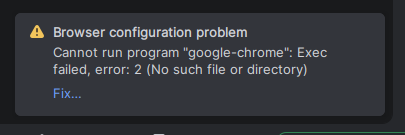
When I click the play button in the toolbar, I get the same error about Google Chrome Internet browser?
Please see below screenshot of the above error message:
Any help with this would be greatly appreciated, thank you!
Jesse
Please sign in to leave a comment.
It looks like a permissions issue. Did you install the IDE using Flatpak? It works as a sandbox environment - each pack has its own runtime environment and because of security reasons, flatpak apps do not have direct access to host files. There could be a lot of problems due to this.
Please try reinstalling the IDE using one of the officially recommended options (https://www.jetbrains.com/help/webstorm/installation-guide.html) - download the
tar.gzfrom https://www.jetbrains.com/webstorm/download/#section=linux, or use the toolbox app to manage installations.Hi,
Thank you for the help.
I installed the Webstorm via the Toolbox.
Still same error message about Google Chrome?
I tried to configure it to use Firefox, but same error above?
Any ideas?
Jesse
Please try specifying full path to Chrome executable instead of
google-chrome- does it help?Hi,
Sorry, but I do not need to run web app in Google Chrome.
Trying to run web app in Mozilla Firefox.
Please again see above screenshot, web application has issue on Firefox.
I disabled Chrome and selected Firefox above, but the IDE still complains about Chrome?
Very confused…
Jesse
Debugging is only supported in Chrome and browsers of the Chrome family, as stated in the help. So, when you start the app with the run/debug action, the IDE will try to open Chrome (or, if it can't be found in the list of browsers in Settings | Tools | Web Browsers and Preview, the first listed Chromium-based browser will be used).
If you don't need to debug your application and would just like to preview your page in Firefox, try using the browser bar in the upper right corner of the editor to open the page in the browser of your choice.
Interesting issue. Since CachyOS is Arch-based, I wonder if this is related to how WebStorm detects browsers on the system. Have you tried configuring the browser manually under Settings → Tools → Web Browsers and Preview? The exact error message would be helpful for narrowing down the cause. https://fnaf1game.io