Jetbrains Toolbox and update of DataGrip

For a while now updating DataGrip became a bit of a mystery. I am on 2026.1.3 and every now and then I get a notification here:
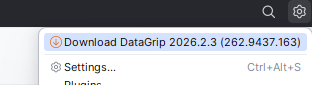
I click it, nothing happens.. (it used to work).
Then in Jetbrain toolbox I see three references to the same thing without update:
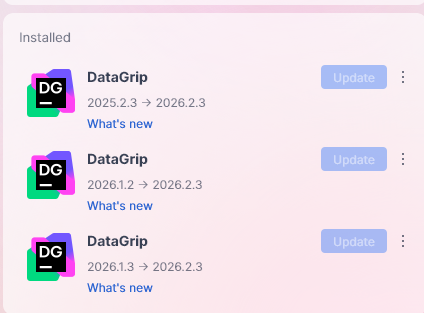
Clicking on all of them shows “Opening” and that's it, nothing else happens
Please sign in to leave a comment.
My guess is that DataGrip is installed in a directory where Toolbox can’t write. For example, in Program Files. Please check this article for a workaround:
https://toolbox-support.jetbrains.com/hc/en-us/articles/13696838691474-How-to-update-a-tool-if-The-installation-path-is-not-writable-error-is-shown
I also found a similar case in our tracker, resolved with a clean installation:
https://youtrack.jetbrains.com/issue/TBX-14088
If this doesn’t help, please attach your Toolbox logs from **Settings | About | Collect logs and diagnostic data**. You can use JetBrains Uploads for this:
https://uploads.jetbrains.com/
…or file a new issue in:
https://youtrack.jetbrains.com/issues/TBX
Please let us know how it goes.
I wanted to circle back to this subject. For some reason I have three entries in the toolbox:
None of them opens DataGrip if I click on it. The only one that's working is the "C:\Program Files\JetBrains\DataGrip 2026.1.3\bin\datagrip64.exe" installation but this one can't update.
I did use the previous installation due to really poor UX with lack of contrast in the new version. Ideally I would like to run both, the 2026.1.3 that I like, and the newest one.. how do I do that? I had a lot of problems with sync settings so I just want to make sure I don't lose it
It seems that the workaround above doesn't help. Could you share the logs with us, as I mentioned in the previous reply? Thanks!
Which files from the logs are needed. I don't want to upload everything because it contains names of projects/clients