Installed DataGrip on second device - settings not synced

I had to get a second machine in case my first one dies (ah the heat!) and I signed with the same account, enabled Backup & Sync. It says it synced everything correctly, restarted DataGrip, but my keymaps for example have not been ported (all settings are selected in both machines)
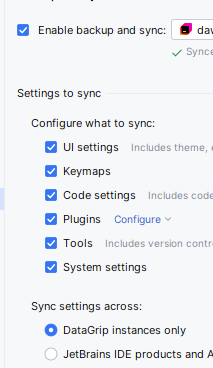
And the worst thing happened that the settings from new device were also synced and my UI and keymaps from older version are now gone. How do I get my previous settings?
I tried to import some settings I saved a long time ago but now even my code styles are gone.. how can I retrieve them?
Please sign in to leave a comment.
Hi,
You can restore the old-machine keymaps and UI settings from the Backup and Sync commit history. This works only if Backup and Sync was enabled on the old machine and pushed to the account at least once before the reset.
To restore:
1. Press Shift twice to open Search Everywhere.
2. Run Backup and Sync History.
3. Pick a commit from before the overwrite.
4. Click Reset to this State.
Full recipe with screenshots: How to restore IDE settings via the Settings Sync/Backup and Sync History (https://youtrack.jetbrains.com/articles/SUPPORT-A-390).
Please let me know if that helped!
What about Consoles? Why are they suddenly gone?
Could you clarify what you mean by Consoles? A few things in DataGrip could go by that name, and the answer depends on which.
If you mean query consoles (the SQL files attached to each data source, listed in the Files tool window under Scratches and Consoles | Database Consoles), they are stored in DataGrip's configuration directory, not in the project, and Backup and Sync does not include them, so they were never synced between the two machines. If the old machine still has DataGrip installed, the files are still on disk, in the consoles subdirectory of the IDE configuration directory: https://www.jetbrains.com/help/datagrip/directories-used-by-the-ide-to-store-settings-caches-plugins-and-logs.html#config-directory
If you mean something else, a Terminal session, an entry in the SQL log/history, or a tool window I have not guessed, a screenshot or the exact label of what has disappeared would help me point you to the right place. Thank you!