Annoying agent background always present

CLion and the other IDE's I use getting worse and worse with each version. Sorry this is my real feeling. What's annoying with the latest version I installed today (2036.3.0.1) is, that for a blank IDE without open file tabs, the (Air?) agent is now present in the main window background.
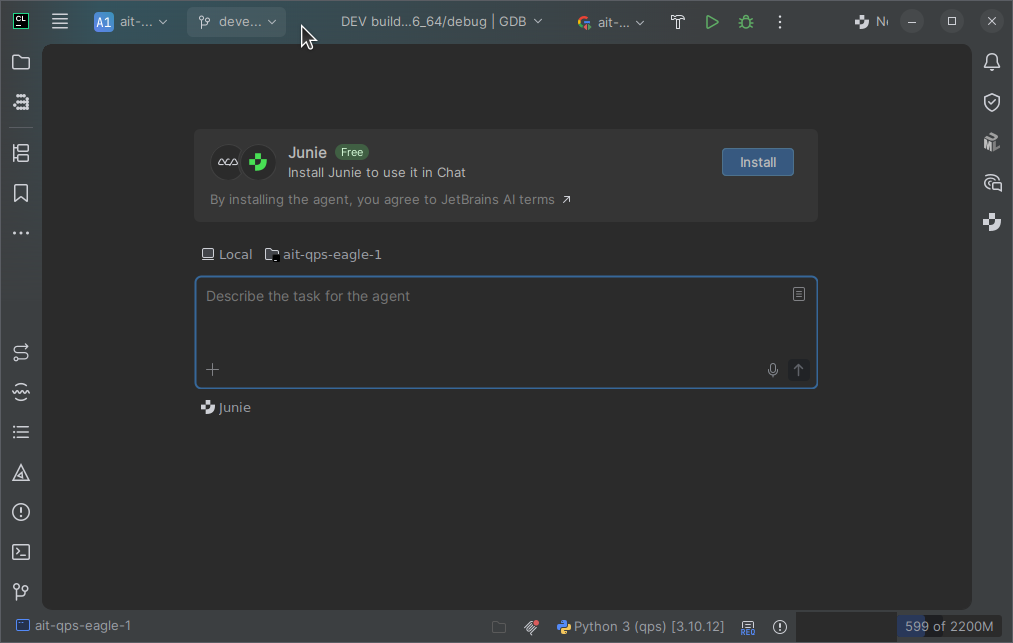
I could not find a setting (there are many settings but most of them I don't understand) to disable this. I want the agents only in a tool window, similar as in previous versions. The only way to get rid of this is to disable Air at all?
I'm working on projects where I use the agents but also where I an not allowed to use Agents. When my boss sees the IDE showing up an agent in a prominent place, this can lead to discussions.
I can not imagine I am the only one struggling with all this major feature changes and look? Please consider that some of us are doing daily work without the wish to have a new fancy feature with every update.
Please sign in to leave a comment.
Hi,
You don't have to disable Air to remove the agent prompt from the empty editor. In CLion 2026.3, though, the only control is an internal registry key. The request for a real setting is IJAI-2741. The fix is done but not released yet. When a release includes it, the issue will show its build. Vote for the issue to get updates.
IJAI-4531, a duplicate of it, lists this workaround:
Registryand select Registry....air.inline.empty.state.promptand clear its checkbox.If the prompt is still there after the restart, open and close any file. The registry holds internal options, so the key can change in a later version. Other users on IJAI-2741 report that it removes the prompt.