How to use Compact format?
Answered

Hi everybody,
can please somebody tell me how to use the >>Compact format (fewer line breaks) action<< on selected blocks as described here:
When I select a block and press "ALT+Enter" there aren't any Format selections to choose from:
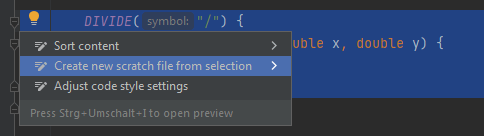
FYI: I haven't tweaked the IDE regarding any formatting specifications.
Many thanks for any help,
Cheers, Slevin
Please sign in to leave a comment.
What IDE do you use - Rider or IDEA?
IDEA at Windows
Could someone please set this thread to NOT answered? Don't know why this was done although the question still isn't answered - and also don't know why the staff took 4 (four) days to approve my last comment.
However, if there is no such built-in-feature like in Rider, is there a workaround to get such a behaviour done? This would be really helpful.
Thanks
This feature is supported in Rider. You may create feature request for similar feature in IDEA: https://youtrack.jetbrains.com/issues/IDEA